Home
SunFounder
Touch Panel
TS-10
Page 118
SunFounder TS-10 - Page 118
213 pages
Manual
Save Page as PDF
To Next Page
To Next Page
To Previous Page
To Previous Page
Loading...
SunFounder
TS-10
10.1-inch
T
ouch
Screen
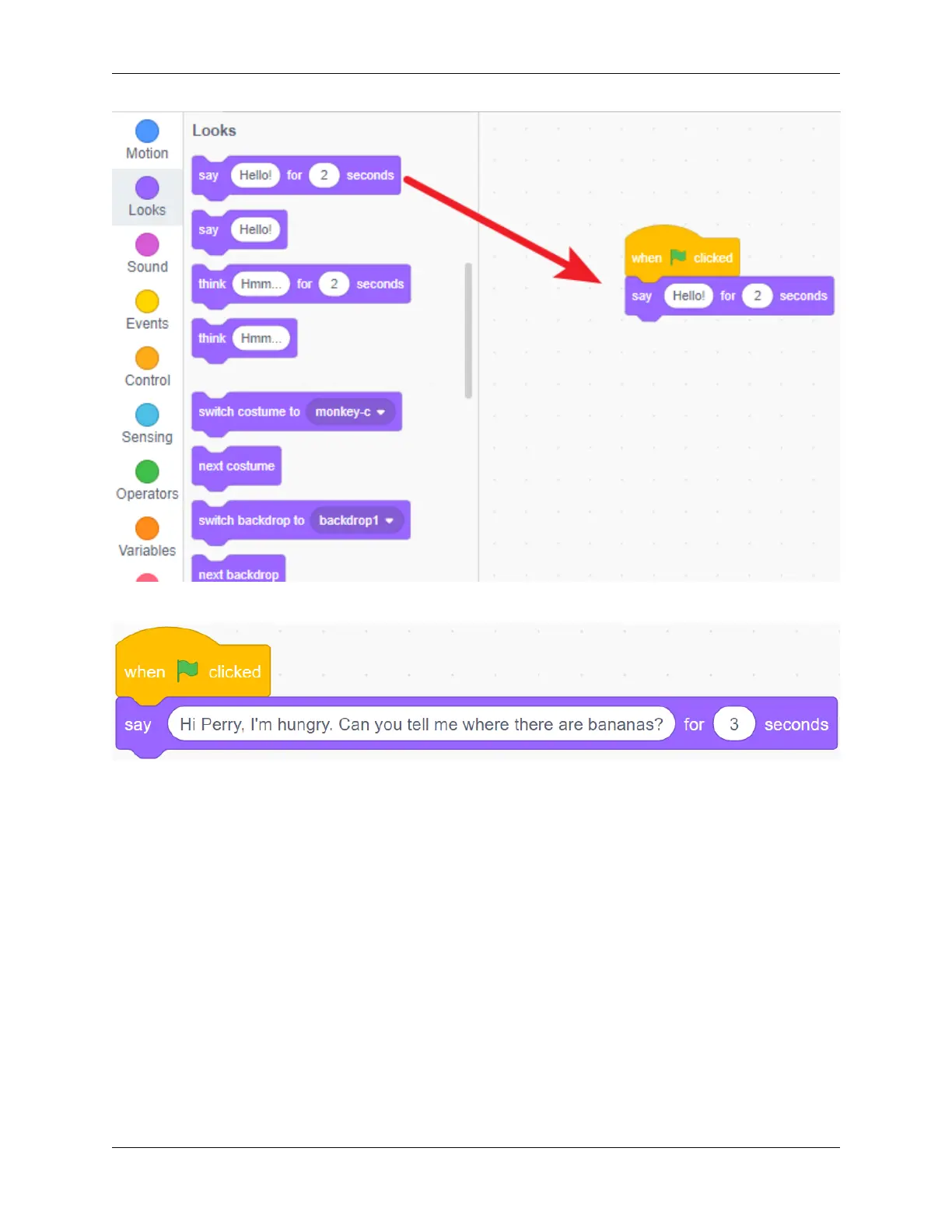
Change
what
it
says
and
how
long
it
says
in
the
input
box.
P
erry
had
seen
bananas
in
the
park,
so
he
told
Harley
.
Perry
is
a
Frog,
add
Frog
sprite
and
Forest
backdrop.
114
Chapter
5.
PROJECTS
AND
A
CTIVITIES
117
119
Table of Contents
Main Page
Table of Contents
3
Hardware Description
7
Install the Raspberry Pi os
11
Assembly Instructions
17
Quick User Guide
25
Adjust the Resolution
25
Install Virtual Keyboard
28
Right Click Function
33
Projects and Activities
35
Multimedia Options
35
Watch Video
35
Read E-Book
36
Play Game
37
Retro Games Console
38
Description
38
Required Components
39
Game System Installation
41
Retropie Configuration
44
Printer Monitor
45
Touch UI
46
Make a 3D Model
46
Print 3D Model
52
Video
56
Home Assistant
56
Install Home Assistant
56
Install and Configure Esphome
58
Log in
66
Add Smart Devices
71
Add DIY Device with ESP32
75
Start the Home Assistant Service at Boot
79
Enter the Home Assisant Page at Boot
79
Home Assistant File Structure
80
Cloud4Rpi
81
Quick Guide on Cloud4Rpi
81
Learn more about Control.py
87
Projects
88
GPIO Programming
105
Electronic Kit for Raspberry Pi and Arduino
105
Da Vinci Kit for Raspberry Pi
105
Scratch Projects
106
Animate a Name
107
Create a Story
114
Make Music
124
Clicker Game
129
Shooting Game
134
Hit the Magic Fish
142
Binary Game
150
Flappy Parrot
158
Paint Box
169
Eating Banana Game
184
Create Musical Instrument
187
DIY Monitor Device
192
Install Other Systems on Raspberry Pi
196
Appendix
197
Assemble the Camera Module
197
GPIO Extension Board
199
Obtain the IP Address of the Raspberry Pi
201
Use the SSH Remote Control
202
Printed Support
207
Faq
211
Copyright Notice
213
Related product manuals
SunFounder TS7-Pro
235 pages
SunFounder 7-inch Touch Screen
39 pages



 To Next Page