EasyManua.ls Logo

Sungale CD700A - Page 8

Sungale CD700A
28 pages
Print Icon
To Next Page IconTo Next Page
To Previous Page IconTo Previous Page
Loading...
Chapter
1
Introduction
Parts
and
components
The
components
provided
may
differ
in
appearance
with
the
images
provided.
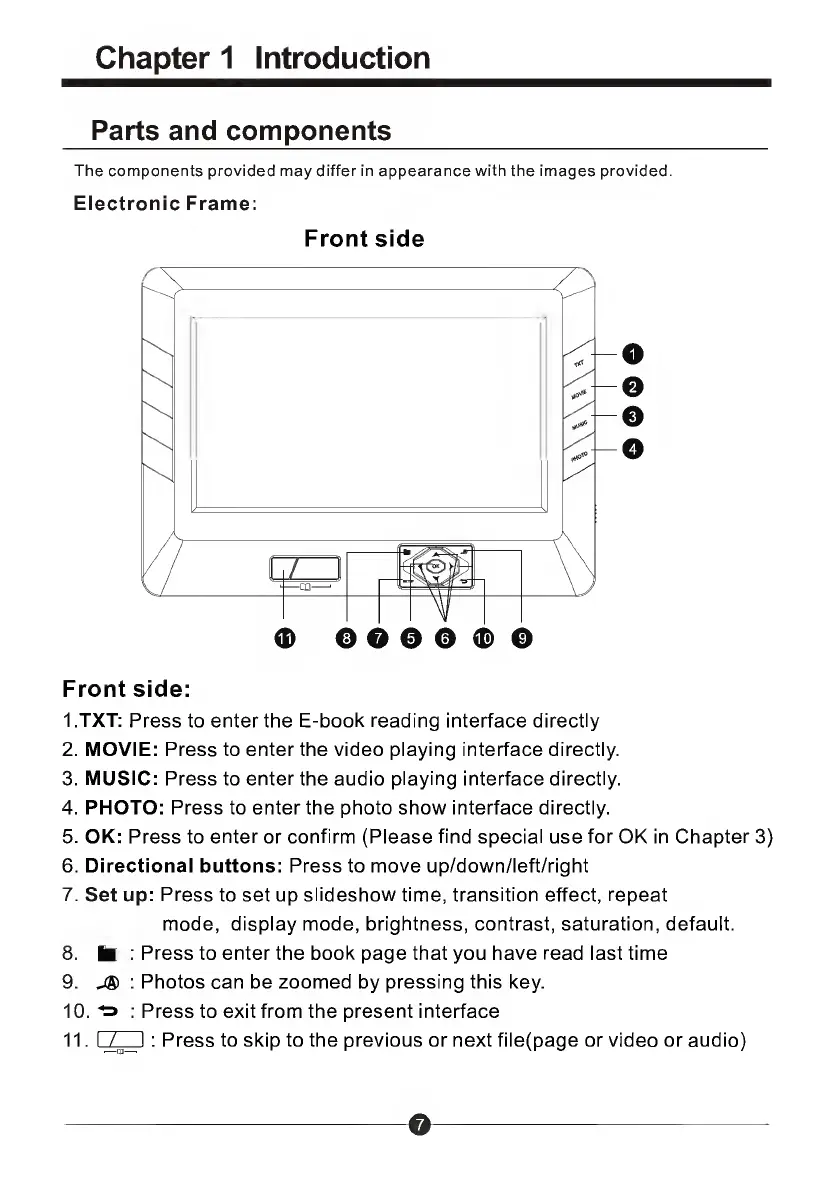
Electronic
Frame:
Front
side
0
0
0
©
Front
side:
1
.TXT:
Press
to
enter
the
E-book
reading
interface
directly
2.
MOVIE:
Press
to
enter
the
video
playing
interface
directly.
3.
MUSIC:
Press
to
enter
the
audio
playing
interface
directly.
4.
PHOTO:
Press
to
enter
the
photo
show
interface
directly.
5.
OK:
Press
to
enter
or
confirm
(Please
find
special
use
for
OK
in
Chapter
3)
6.
Directional
buttons:
Press
to
move
up/down/left/right
7.
Set
up:
Press
to
set
up
slideshow
time,
transition
effect,
repeat
mode,
display
mode,
brightness,
contrast,
saturation,
default.
8.
to
:
Press
to
enter
the
book
page
that
you
have
read
last
time
9.
:
Photos
can
be
zoomed
by
pressing
this
key.
10.
Ta
:
Press
to
exit
from
the
present
interface
11.
I
I
:
Press
to
skip
to
the
previous
or
next
file(page
or
video
or
audio)
o

Related product manuals