EasyManua.ls Logo

Sungale CD700A - Special Use for OK Button

Sungale CD700A
28 pages
Print Icon
To Next Page IconTo Next Page
To Previous Page IconTo Previous Page
Loading...
Chapter
4
Settings
Special
Use
for
OK
button
Setup
movie
playing
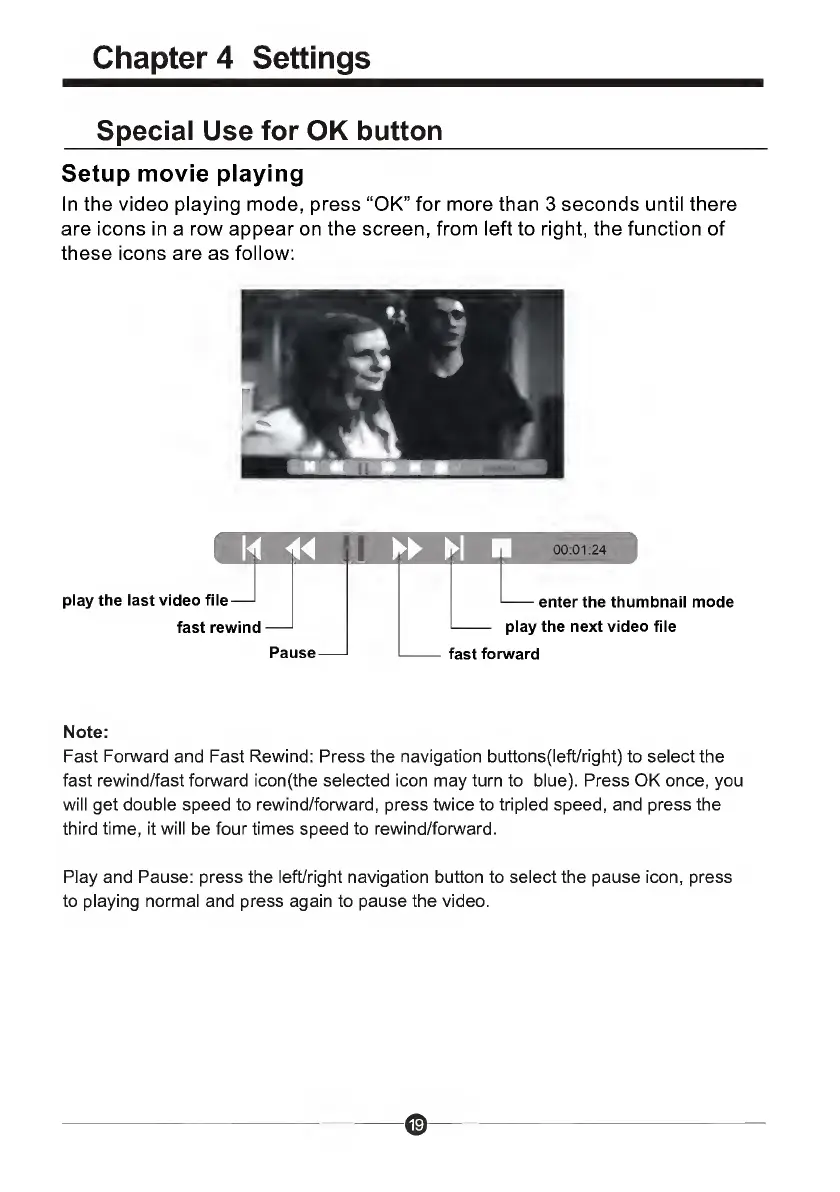
In
the
video
playing
mode,
press
“OK”
for
more
than
3
seconds
until
there
are
icons
in
a
row
appear
on
the
screen,
from
left
to
right,
the
function
of
these
icons
are
as
follow:
.
1
III
i
X
E
00:01:24
play
the
last
video
file
fast
rewin
n
d-
Pai
ise-
fast
for
-enter
the
thumbnail
mode
play
the
next
video
file
ward
Note:
Fast
Forward
and
Fast
Rewind:
Press
the
navigation
buttons(left/right)
to
select
the
fast
rewind/fast
forward
iconfthe
selected
icon
may
turn
to
blue).
Press
OK
once,
you
will
get
double
speed
to
rewind/forward,
press
twice
to
tripled
speed,
and
press
the
third
time,
it
will
be
four
times
speed
to
rewind/forward.
Play
and
Pause:
press
the
left/right
navigation
button
to
select
the
pause
icon,
press
to
playing
normal
and
press
again
to
pause
the
video.

Related product manuals