EasyManua.ls Logo

Sungale CD700A - Page 21

Sungale CD700A
28 pages
Print Icon
To Next Page IconTo Next Page
To Previous Page IconTo Previous Page
Loading...
Chapter
4
Settings
Special
Use
for
OK
button
Enter
the
File
List
1.
Select
the
storage
in
the
main
menu,
press
OK
to
confirm.
2.
Press
the
navigation
buttons
to
select
the
FILE
icon,
select
the
folder
and
press
OK
to
enter
the
file
list.
Copy
Function
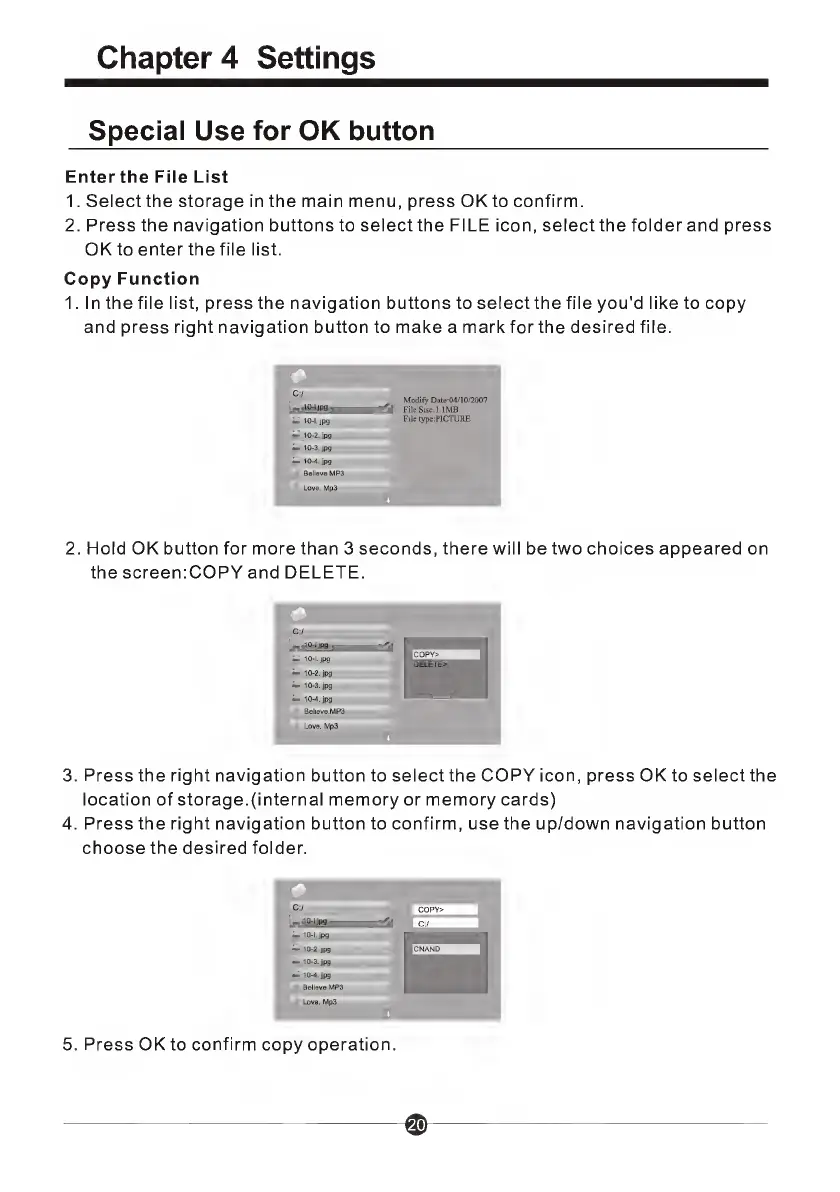
1.
In
the
file
list,
press
the
navigation
buttons
to
select
the
file
you'd
like
to
copy
and
press
right
navigation
button
to
make
a
mark
for
the
desired
file.
C:/
jpg—
10-1.
jpg
10-2.jpg
10-3.jpg
10-4.jpg
BelievB.MP3
Modify
Date:04/10/2007
File
Sise:l.lMB
File
type:PICTURE
2.
Hold
OK
button
for
more
than
3
seconds,
there
will
be
two
choices
appeared
on
the
screen:COPY
and
DELETE.
3.
Press
the
right
navigation
button
to
select
the
COPY
icon,
press
OK
to
select
the
location
of
storage.(internal
memory
or
memory
cards)
4.
Press
the
right
navigation
button
to
confirm,
use
the
up/down
navigation
button
choose
the
desired
folder.
5.
P
r
ess
OK
to
confirm
copy
operation.

Related product manuals