EasyManua.ls Logo

Sungale CD700A - Page 22

Sungale CD700A
28 pages
Print Icon
To Next Page IconTo Next Page
To Previous Page IconTo Previous Page
Loading...
Chapter
4
Settings
Special
Use
for
OK
button
Delete
function
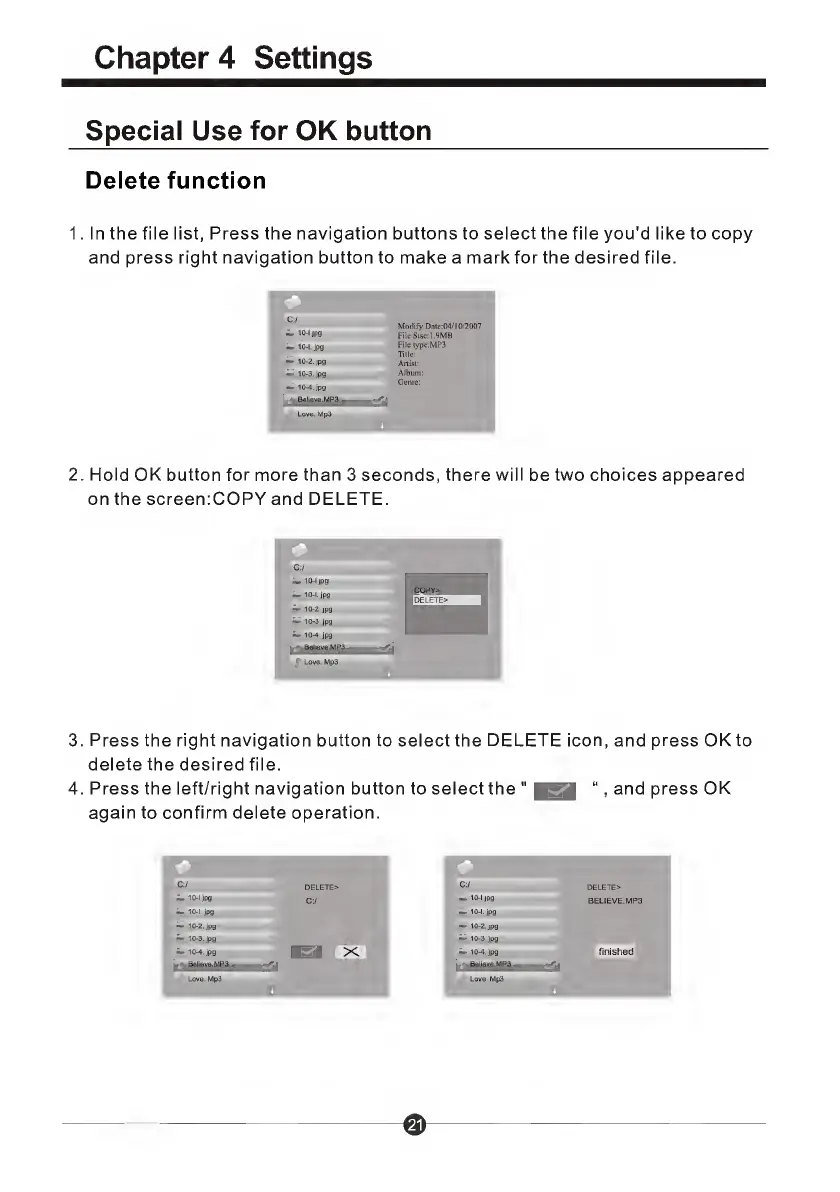
1.
I
n
the
file
list,
Press
the
navigation
buttons
to
select
the
file
you'd
like
to
copy
and
press
right
navigation
button
to
make
a
mark
for
the
desired
file.
2.
H
o
l
d
OK
button
for
more
than
3
seconds,
there
will
be
two
choices
appeared
on
the
screen:COPY
and
DELETE.
3.
Press
the
right
navigation
button
to
select
the
DELETE
icon,
and
press
OK
to
delete
the
desired
file.
4.
Press
the
left/right
navigation
button
to
select
the
"
lisa
“,
and
press
OK
again
to
confirm
delete
operation.
C:/
DELETE>
C:/
DELETE>
10-1
jpg
C;/
10
-'jP9
BELIEVE.MP3
10-1.
jpg
-
10-1.
jpg
10-2.jpg
10-2.jpg
10-3.jpg
10-3.jpg
10-4.
jpg
BS1
X
io-4.
jpg
finished
Believe.MP3
Believe.MP3
1
Love.
Mp3
Love.
Mp3

Related product manuals