My Cloud Album
Step 1:
Step 3:
Step 4:
Step 5:
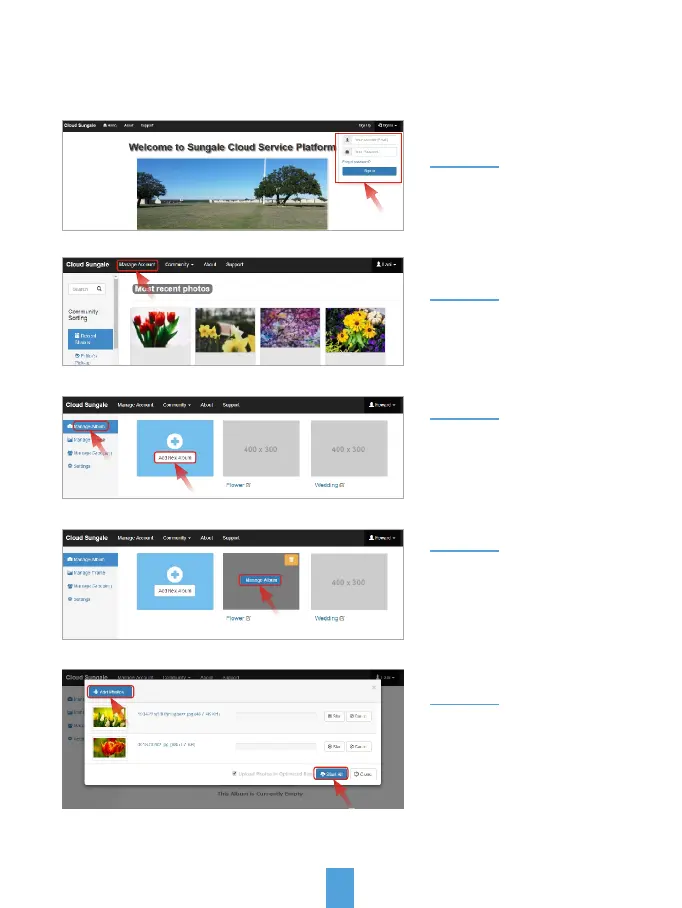
Select "Manage Album"
and then select "Add New
Album", name your album,
and click "OK" to save it.
Step 2:
Select "Manage Account"
go to manage page.
Move the cursor to the new
album you just created, click
"Manage Album" and click
the cloud icon to add photos.
Click "Add Photos" button,
choose photos from your
computer and click "Start All"
button to upload photos.
20
Go to www.cloud.sungale.com,
login into your account
Note: Allow up to 20 images
to be uploaded at a time.
2) Add photos to the Cloud from your computer:



 To Next Page