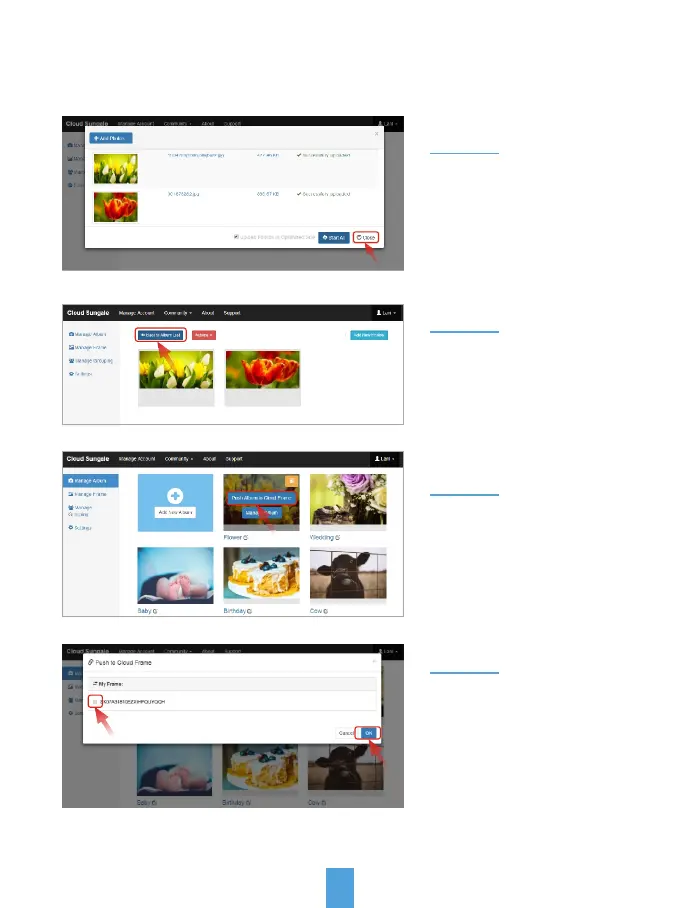
Step 6:
Step 7:
Step 9:
My Cloud Album
Select your frame and click
"OK" button, now your have
sent an album to your frame.
21
Click "Back to Album List"
go back to Manage Album
page.
When all photos uploaded,
click "Close" button to close
the upload page, you'll see
your photos have been
uploaded.
Step 8:
Move the cursor to an album
that you want to send to your
cloud frame, then click "Push
Album to Cloud Frame" button.
Now, You or your friends
and loved ones can see the
photos you shared to the
cloud frame.
2) Add photos to the Cloud from your computer:



 To Next Page