14
WWiirriinngg SStteeppss
step 1 Unscrew the waterproof terminal “
” at the bottom of COM100.
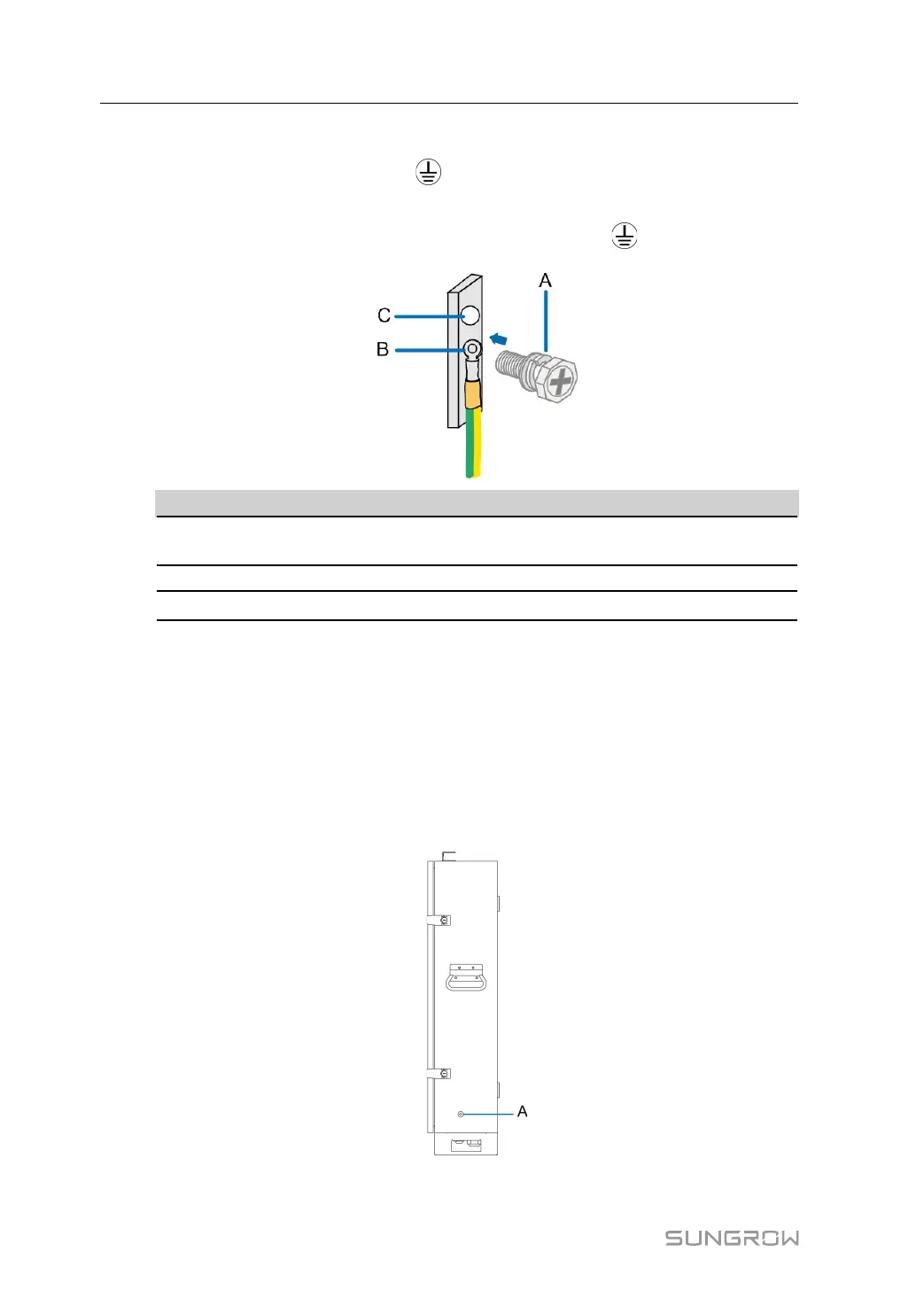
step 2 Connect the yellow-green grounding cable led from outside to the grounding copper
bar inside COM100 through the internal waterproof terminal “
”.
IItteemm DDeeffiinniittiioonn RReemmaarrkk
A
M6 bolt assembly
It has been installed on the copper bar before
delivery.
B OT terminal
-
C
Grounding hole
-
step 3 Secure the cable with M6 bolt, where the fastening torque is 7.5±0.5N·m.
step 4 Screw the waterproof terminal at the bottom of COM100.
-- -- EEnndd
4.4.1.2 PE Point Grounding
PPoossiittiioonn DDeessccrriippttiioonn
The external PE point of COM100 is shown by A in the figure below.
4 Electrical Connection User Manual


 To Next Page