10 Troubleshooting User Manual
36
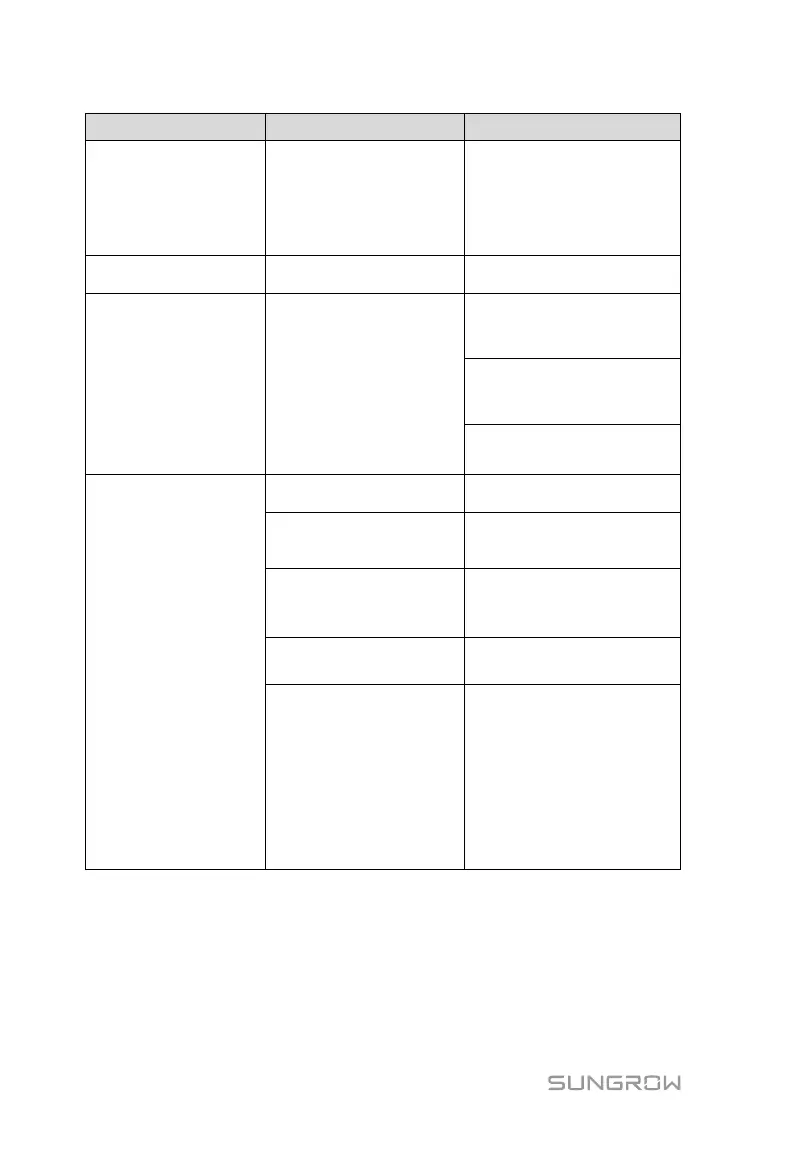
2. Check whether the IP
address and Modbus
address of the PCS are
correctly set.
AC circuit breaker of the
PCS is open.
Close the AC circuit
breaker.
PCS Direct Grid V-Diff
too Large Alarm
In the case that multiple
PCSs are directly
connected in parallel on
the AC side, battery
voltages on the DC side
differ from each other,
and the difference
exceeds the set value.
1. Check whether the
parameter is set to an
appropriate value.
2. Check whether "Balance
Control Enable" is enabled.
3. Check whether voltage
equalization is invalid.
1. Check whether PCS has
a fault.
2. An emergency stop
occurs on the PCS.
2. Check whether the PCS
is in the emergency stop
state.
3. PCS container node
collects node fault.
3. Check whether the dry
contact in the PCS
container is faulty.
4. Check whether faults
occur in the BCP.
5.The number of racks in
normal operation is less
than the lower limit.
5. Check whether The
number of racks in normal
operation is less than the
lower limit.
Note: When the alarm
occurs, the corresponding
devices (including the PCS,
PCS container, battery,
and battery container)
cannot operate.
Note: * applicable only to SC1000 whose AC side is directly connected in
parallel.



 To Next Page