54
SG5.0-20RT-P2 is used with optimizer, and uses WiNet-S module. The WiNet-S module
supports Ethernet communication and WLAN communication. It supports EasyConnect and
can receive and transmit data of optimizers, meters, and chargers.
The WiNet-S/WiNet-S2 communication for Ethernet cannot be used simultaneously with A1
and B1 terminals for RS485 daisy chain.
For details, see the quick guide for the WiNet-S module. Scan the following QR code for the
quick guide.
For more information about WiNet-S2, please scan the following QR code to view the quick
guide.
5.7.1 Ethernet Communication
The WiNet-S/WiNet-S2 communication for Ethernet cannot be used simultaneously with A1
and B1 terminals for RS485 daisy chain.
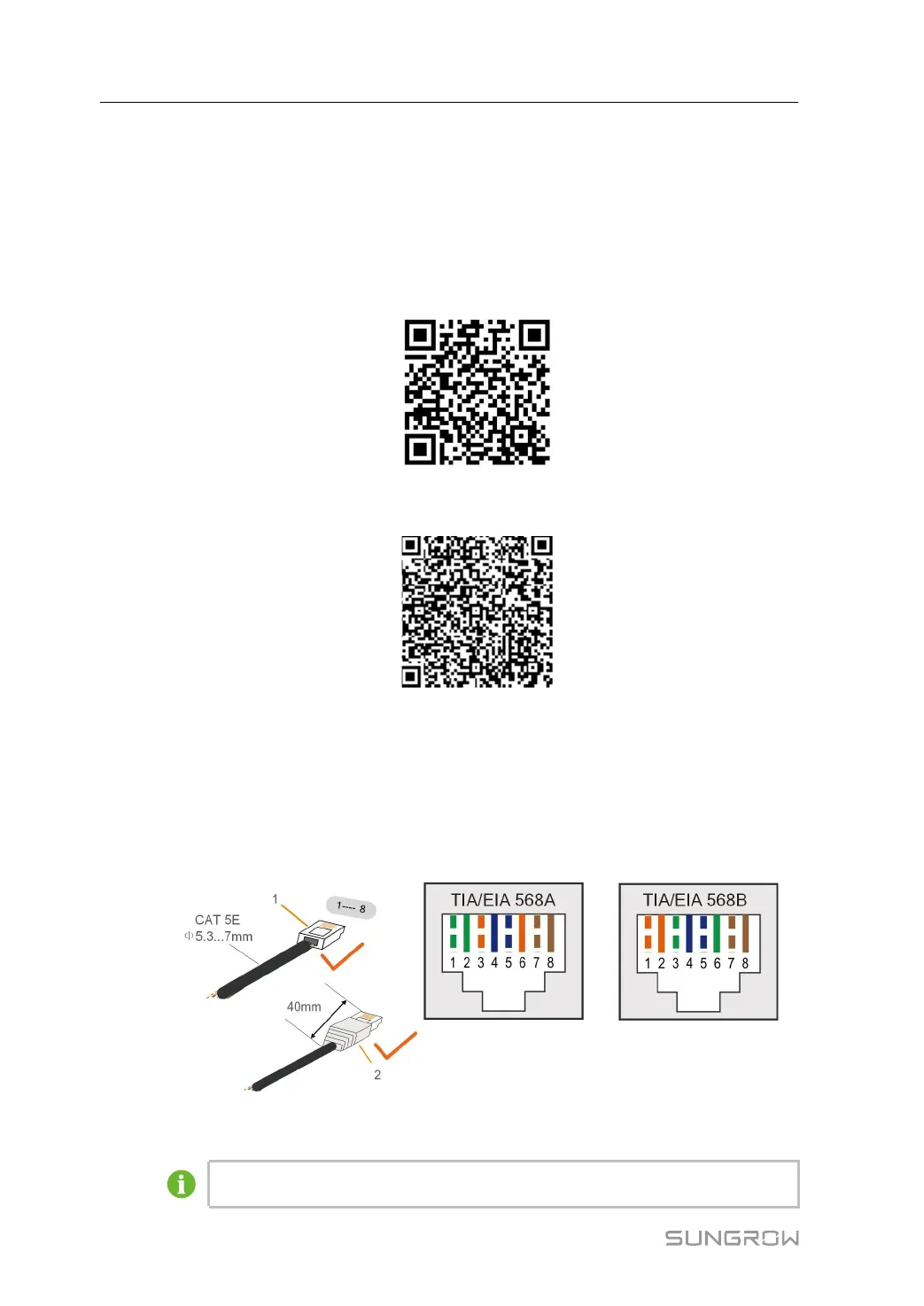
step 1 (Optional) Strip the insulation layer of the communication cable with an Ethernet wire strip-
per, and lead the corresponding signal cables out. Insert the stripped communication cable
into the RJ45 plug in the correct order, and crimp it with a crimper.
1: RJ45 plug 2: Protective cap
Skip this step if a standard network cable with RJ45 plug is prepared.
5 Electrical Connection User Manual






 To Next Page