6 • Questions? Call or Text +1 801-658-0015
CDDP WELDER USERS GUIDE
Note: The audible alarm (beeps) for overheating will still occur even if the “Welder Beeps” option is turned o.
To ensure proper cooling, please maintain a clear space of six or more inches around the welder vents.
Welder Setup
• Remove the welder from the box and place it on a secure work surface. Make sure the work space is
-
tion.
•
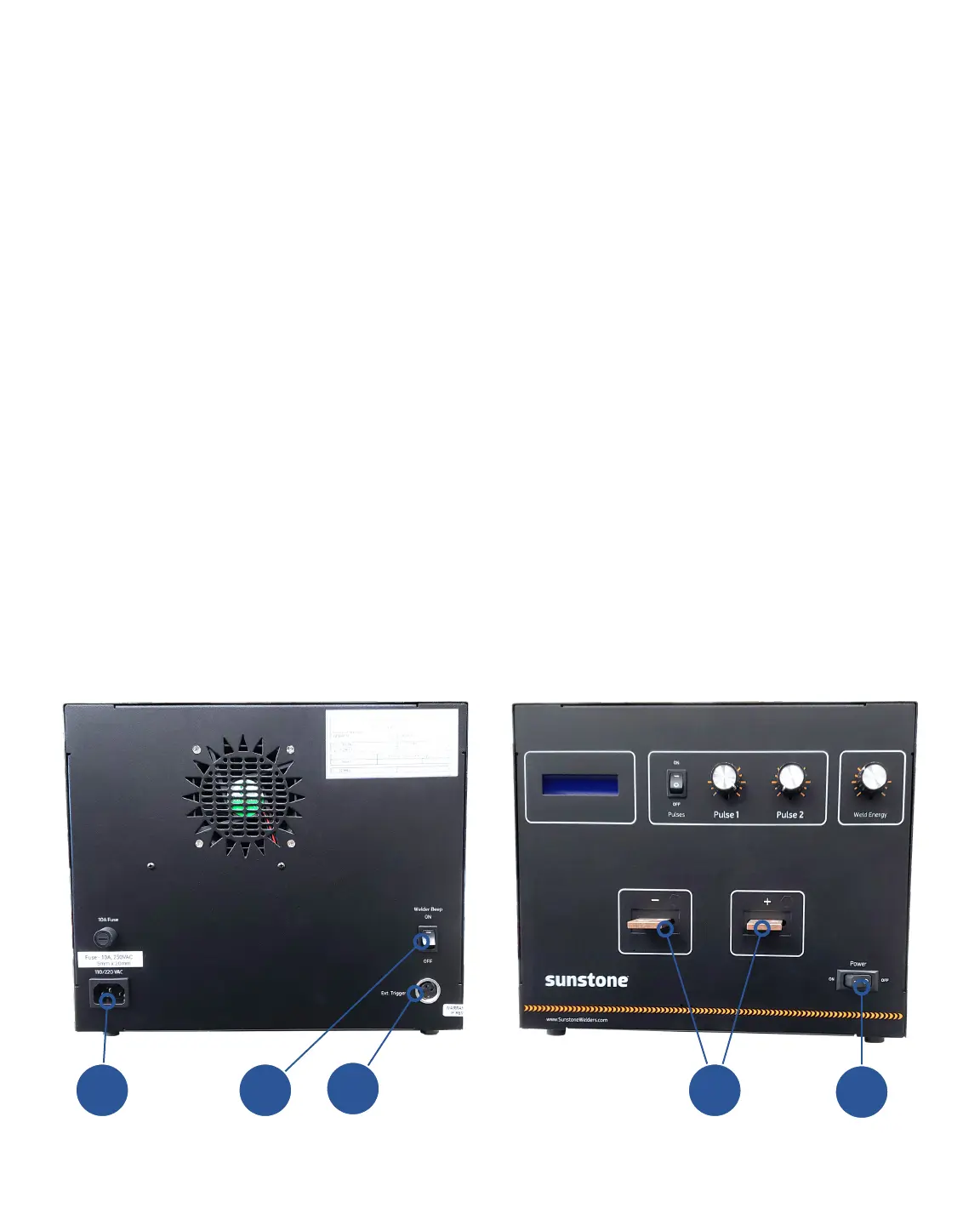
welder’s back panel. See Figure 6.1.
• Connect the external trigger (the component that will trigger the weld, usually a foot pedal) into the Ext.
Trigger port (B) found on the back of the welder.
• You can connect hand attachments or a weld head to the CDDP. Attach the cables to the negative
and positive terminals (C) found on the front of the welder. If you plan to use a weld head, see the next
section, “Weld Head Setup,” for additional information. If you plan to use a hand attachment, see “Hand-
held Attachment Setup” on page 7. If you plan to use a roll spot, see “Roll Spot Setup” on page 8.
• Connect the power cord into the back of the welder and into an AC power outlet (D).
•
Figure 6.1. Back and Front panels of the Sunstone CDDP welder.
A B
D C
E















 To Next Page