80-0067-00-MO-RevF 2017-10-03 SunTech CT40 User Manual | 21
Note: If you see the Auscultatory SphygMode Icon or the Averaging Mode Icon , press the Mode Toggle Button
in succession until these icons no longer show to return to Single Measurement Mode.
Averaging Measurement Mode
Set # of Measurements to Average
Set Time Between Measurements
Press the Mode Toggle Button
until you see the
Averaging Measurement Mode
Icon . . From single
measurement mode, that will only
be one button press.
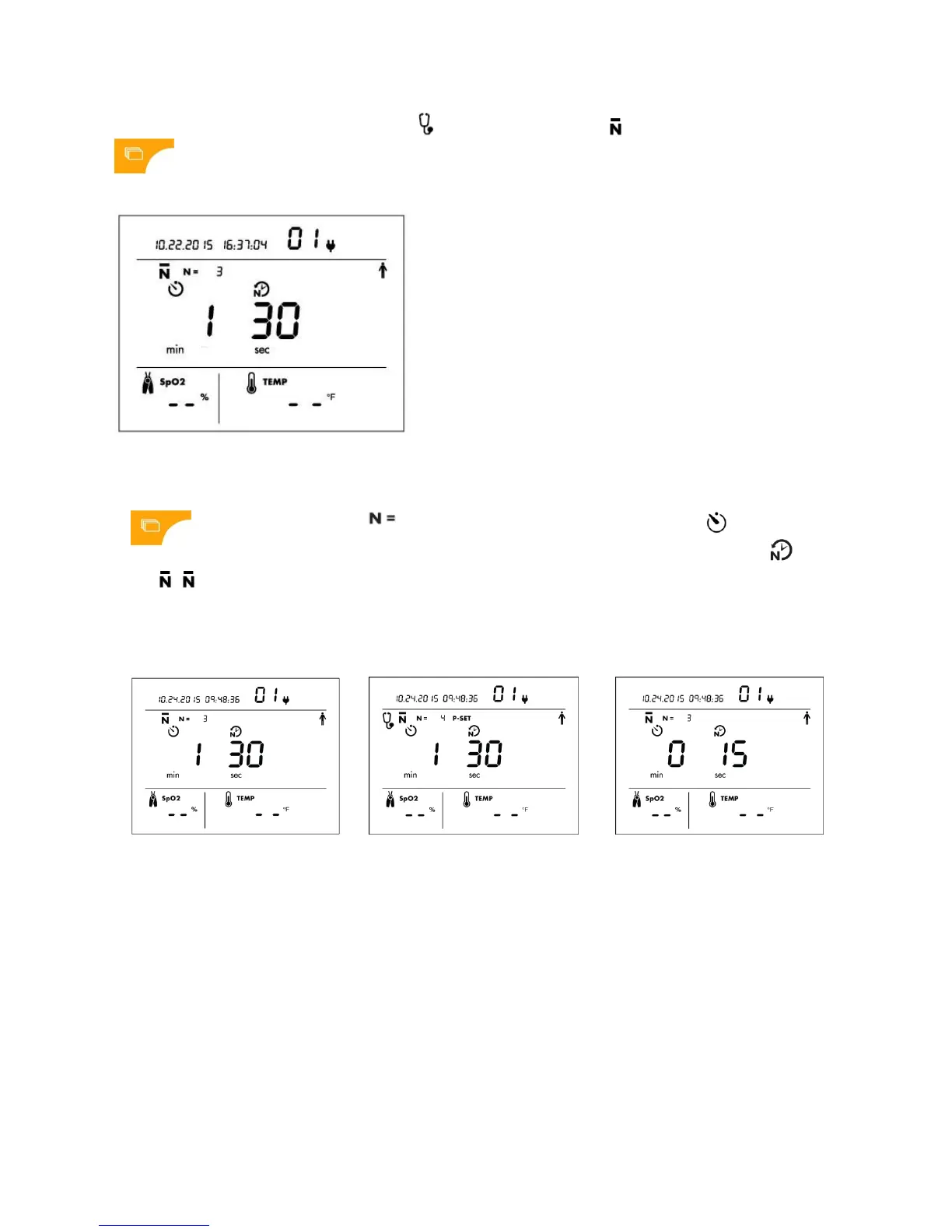
The Number of Measurements Icon
will flash as will the Selection
Knob. To keep the default of 3
measurements, press Knob. Or turn
Knob to choose a different number
and press Knob to select.
Default values for Time Before First
Measurement and Time
Between Measurements will
flash in sequence as the user is
prompted to set each value. To keep
defaults, press Knob. Or turn Knob to
choose new values and press Knob
to select.
Example of Averaging Measurement
Mode setup screen with default
values.
You can select 2 to 5 measurements
to average*. In this example, 4
measurements are set to be
averaged.
On left is Time Before First Reading
will start. Select 0-5 min. Default = 0.
On right is Time Between
Measurements. Select 15-120 sec.
Default = 15 sec.
*Note: In averaging mode, you are unable to see individual readings. Averaged Results will be displayed at the end of all
the readings. By default, all measurements taken (from 2 to 5) will be included in the averaging calculation. Using the
Advanced Configuration Application, the device can be programmed to always throw out the first measurement taken
and not include it in the averaging calculation.
**Note: All values selected during the Averaging Measurement Mode will be displayed the next time that this mode is
used, so that the same customized averaging protocol can be set and used each time that Averaging Measurement
Mode is used.


 To Next Page