23
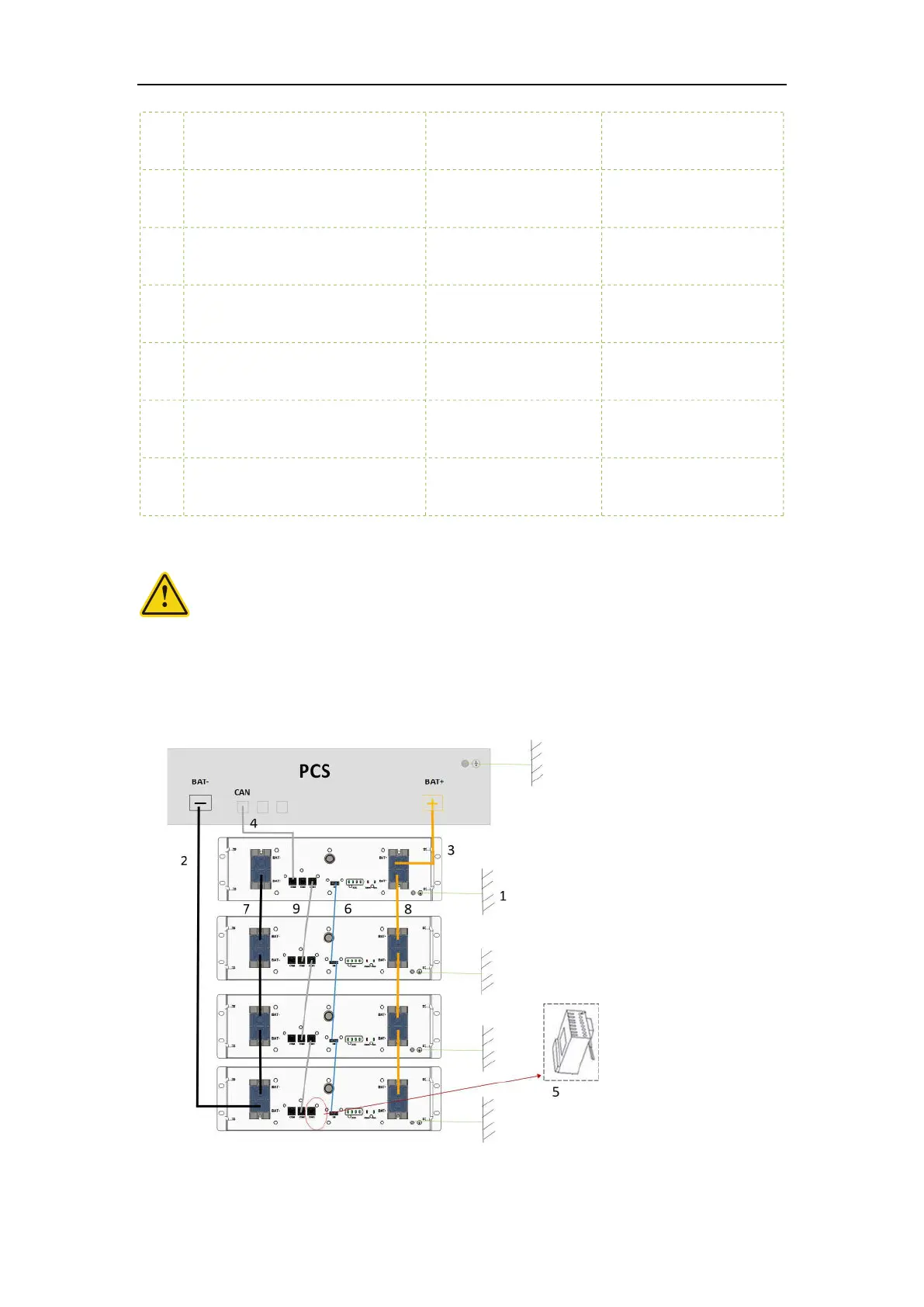
10 Connect the battery with BAT-CAN,
typical color GRAY
8P8C Type 5 Shielded
network cable,2000mm
BAT-COM3 to BAT-COM2
11 Connection with one-button power
on function, paired connection
Power on cable,250mm /
12 Battery positive to positive bus-
bars
600V,700A,
Recommended value
By local provide
13 Battery negative to negative bus-
bars
600V,700A,
Recommended value
By local provide
14 Battery negative to negative bus-
bars
4/0 AWG
Recommended
By local provide
15 Battery positive to positive bus-
bars
4/0 AWG
Recommended
By local provide
10 Connect the display box with BAT-
CAN, typical color GRAY
8P8C Type 5 Shielded
network cable,2000mm
COM to BAT-COM1
4 System commissioning
All cables shall be connected properly
4.1 System power on
① Switch on the inverter (if inverter has the switch button)
② Press POWER button for more than 3s, the system start up and have output voltage, screen
and POWER button is light up.


 To Next Page