25
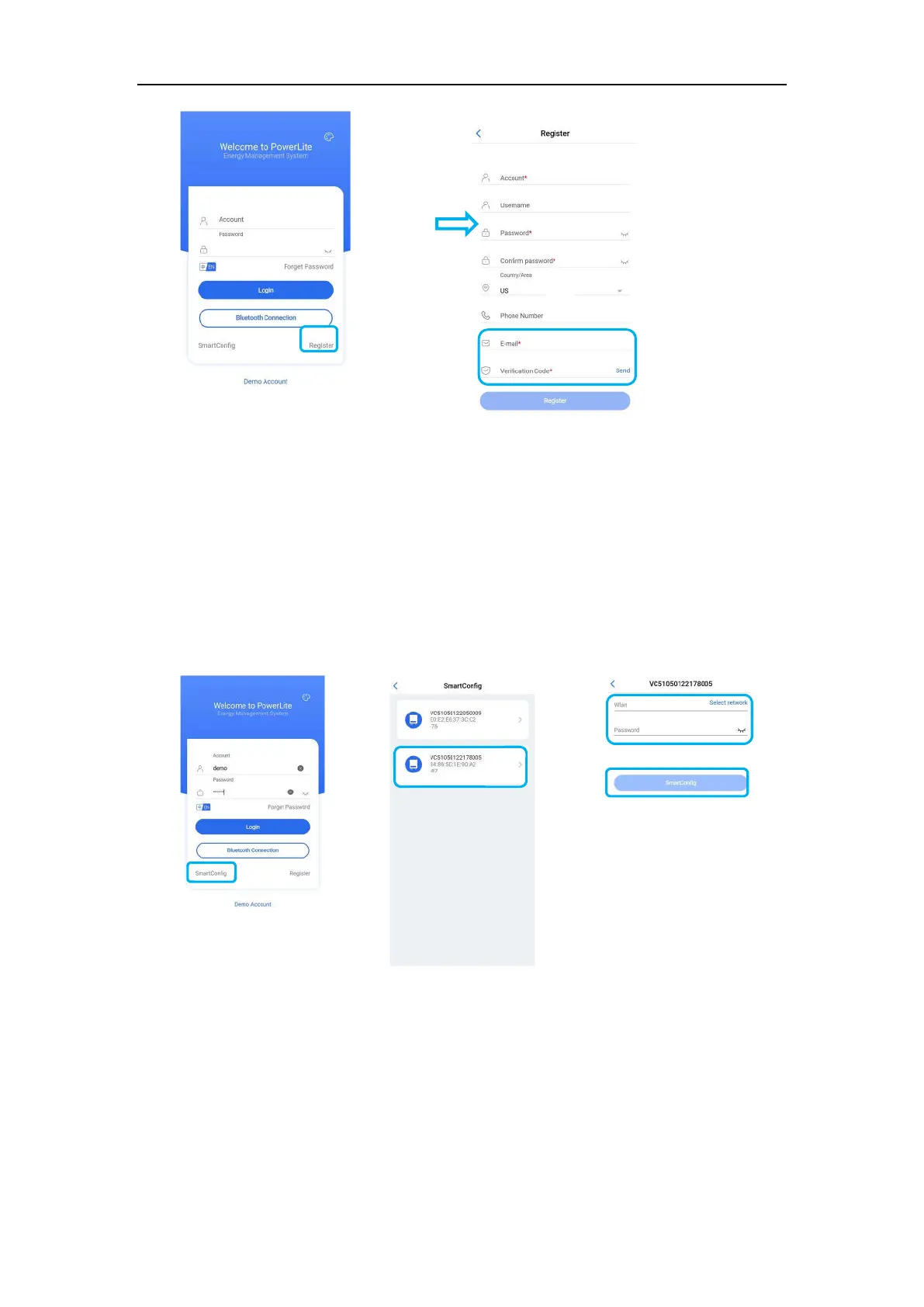
Note: If you have already registered a login account, please ignore this step.
3) Configure the network
(You can check the Bluetooth SN code of the battery device at the antenna position of the control
module)
①Click "SmartConfig", ②Select the Bluetooth device corresponding to the battery, ③Enter the
WiFi network account and WiFi password, ④Click "SmartConfig" to complete the networking,the
APP displays the successful network configuration information and the WiFi icon on the display is
always on, that is, the network configuration is completed.
c. Add site/device
(Please check the battery equipment SN on the control box)
Enter the account, password and verification code, ①Click "Login" to log in. ②After logging in,
click on the top right corner of the main interface to add a site, ③After recommending a power
station, then add equipment, ④ select the SN code on the Data module to add, ⑤And
simultaneously click "Assigned Plant" to bind the battery equipment to the established power
station , complete the site/device addition.
②
③
①
①
②
③
④


 To Next Page