26
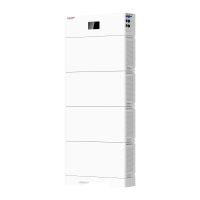
d. Select inverter manufacturer
After the site/device is added successfully, ①Click to enter the corresponding site, ②Click the
Bluetooth SN code of the battery device to enter the battery interface, and you can view the device
data, ③Click “Setting” to enter the inverter manufacturer interface for selecting the battery
system configuration, ④Select After the inverter manufacturer is successfully set, the system
configuration is completed.
Please refer to the table below to set inverter manufacturer parameters.
Inverter manufactures APP setting
Default INV-01
Sacolar INV-02
Goodwe INV-03
Deye INV-04
SMA INV-05
Victron INV-06
Solis INV-07
Selectronic INV-08
MEGAREVO INV-09
LUXPOWER INV-10
①
②
③
④
⑤
①
②
③
④


 To Next Page