ENJOYING YOUR HOT TUB OR SWIM SPA
| 31
Overview
For a more detailed interface manual please visit the
Gecko website and select the IN.K1000 control panel.
Descripon
Nocaon Icons
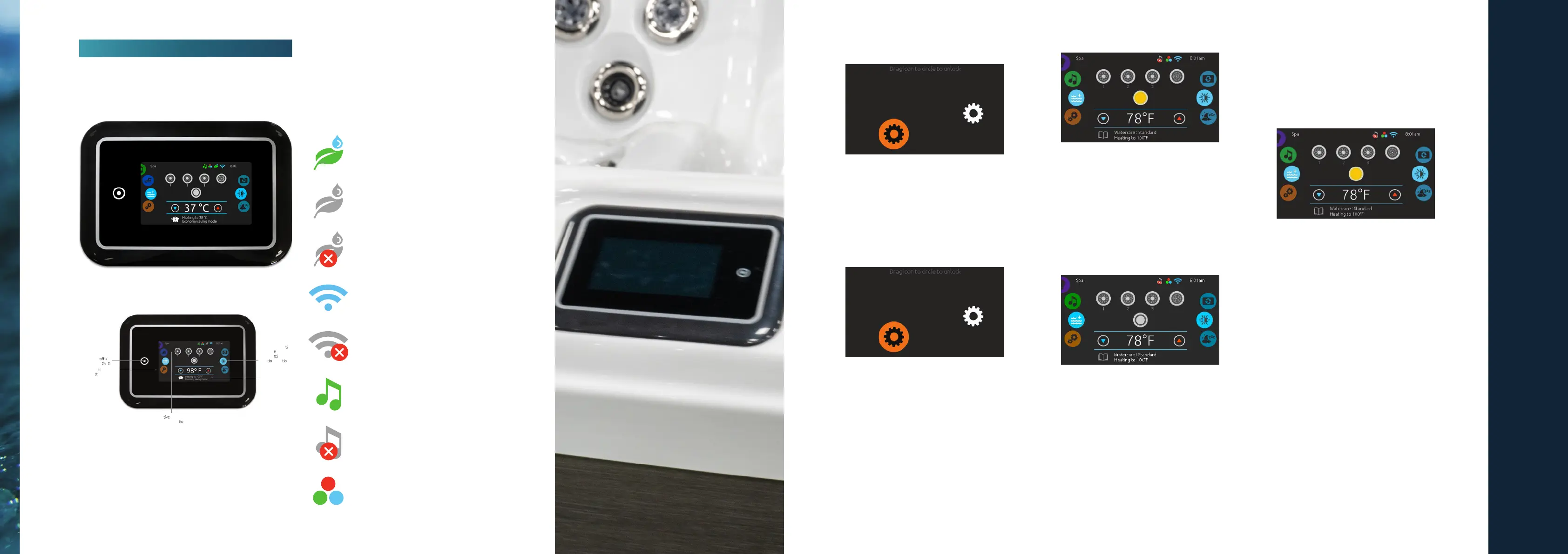
Nocaon icons at the top right-hand side of the
screen show the status of connected value-added
accessories.
Gecko In.K1000
All-on or all ey
(one touch ac
a on)
direct to func on
selec
on wheel
(se
ngsa nd
addi
nalo p ns)
on-screen
system message
and reminder
interac displayi cons
(mains pa func
ns)
mode selec on
wheel (se
ngs
and accessories)
In.Clear system is on
In.Clear system is idle
In.Clear system is o
System is connected to wi
System is not connected to wi
In.Stream 2 Audio system is on
In.Stream 2 Audio system is o
In.Mix is installed
Spa Funcons
Turn Keypad On
3 minutes aer the last pump is turned o, the
screen will shut o if there is no touch acvity.
Touch the screen to turn on the keypad. Then follow
the instrucons on the screen to access
the main screen.
All-on, All-o Target Key
in.k1000+ features an all-on or all-o one touch
acvaon key. When pressed, it stops or starts all
working components and accessories at once.
Start or Stop Accessories
To start or stop an accessory (pump, blower, light),
touch the associated icon. Icons will become
animated when their accessory is turn on, and
animaon will stop when turn o. Icons on the
screen will reect the speed or state of the devices
running on your spa. When an accessory has more
than one speeds press the buon unl it reaches
the desired speed.
Water Temperature
The temperature at the boom of the screen shows
the current water temperature. Use the Up and
Down icon to set the desired temperature. The set
point will appear in blue. Aer 3 seconds without
any changes to the set temperature value, the
current water temperature will reappear.
When the set value is lower than the current
temperature Cooling to xx.x will appear below.
When the set value is higher than the current
temperature, Heang to xx.x will be indicated under
the value. Normally there is a short delay before the
heang starts, during which Heang Suspended is
indicated under the value.
Water Care
The Water care page will help you set up your ideal
ltraon and heang sengs. Choose, set or modify
one of the 5 suggested modes depending on your
needs at any given me.
Away from home
In this mode the spa will always be in economy;
the set point will be reduced by 20° F.
Standard
The spa will never be in economy mode and
will be ltering according to the pack’s low
level conguraon.
Energy Savings
The spa will be in economy mode during the
peak hours of the day and resume normal mode
on the weekend.


 To Next Page