73
Chapter 4: Motherboard Connections
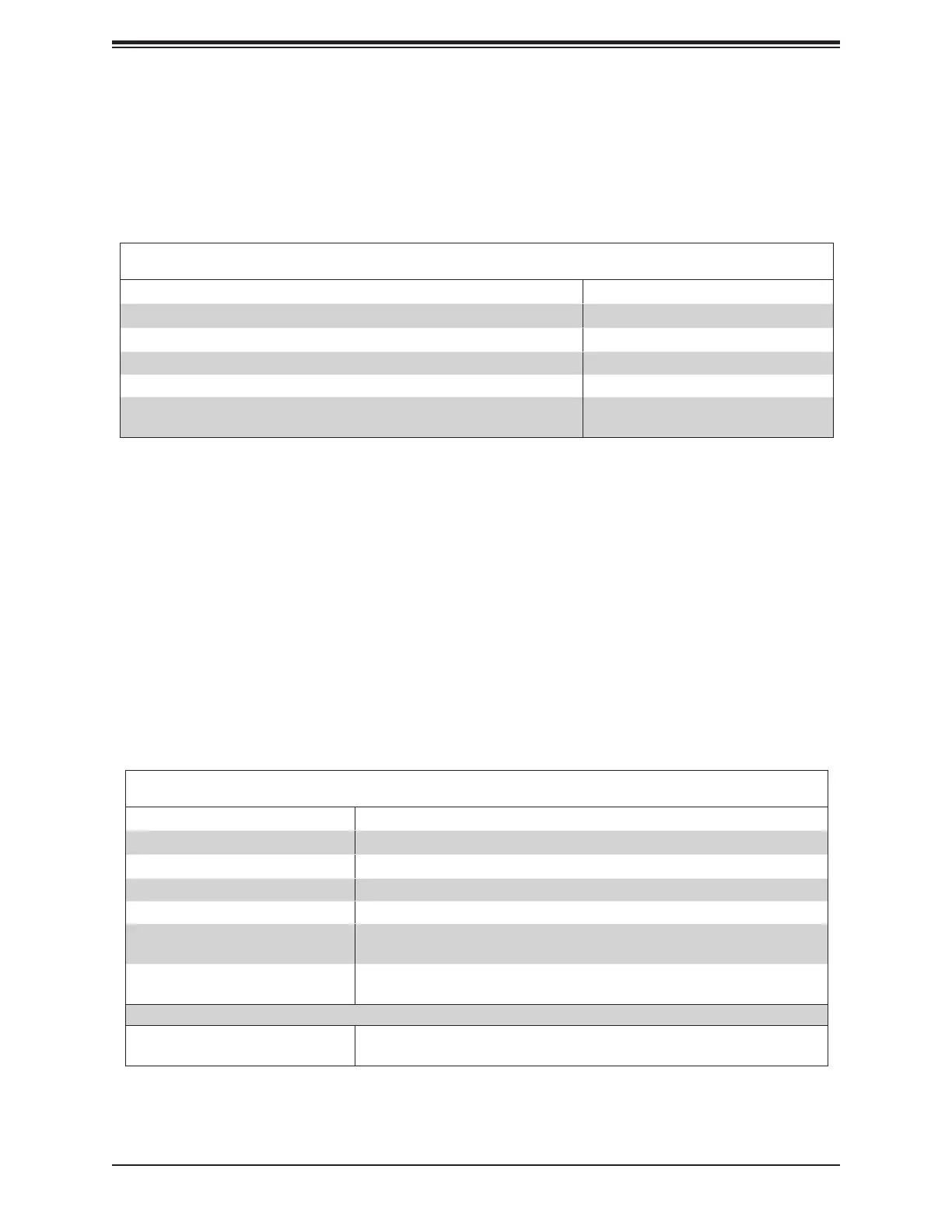
Power On and BMC/BIOS Status LED Button
The Power On and BMC/BIOS Status LED button is located on Pin 1 of the front control panel
display BMC/BIOS status. Refer to the table below for more information.
Power Button
BMC/BIOS Status LED Indicator
Status Event
Green: solid on System power on
BMC/BIOS blinking green at 4Hz BMC/BIOS checking
BIOS blinking gree at 4Hz BIOS recovery/update in progress
BMC blinking red x2 (2 blinks red) at 4Hz, 1 pause at 2Hz (on-on-o-o) BMC recovery/update in progress
BMC/BIOS blinking green at 1Hz Flash not detected or golden image
checking failure
Fail LED (Information LED) (OH/Fan Fail/PWR Fail)
LED States
Status Description
Solid red (on) An overheat condition has occurred.
Blinking red (1Hz) Fan failure: check for an inoperative fan.
Blinking red (0.25Hz) Power failure: check for a non-operational power supply
Blinking red (10Hz) (FP red LED) CPLD recovery mode error(s)
Solid blue UID has been activated locally. Use this function to locate a unit in a rack mount
environment that might be in need of service.
Blinking blue (1Hz) Local UID has been activated locally on. Use this function to identify a unit that
might be in need of service.
BIOS/BMC blinking blue (10Hz) BIOS/BMC: recovery and/or update in progress
Red Info LED blinking (10Hz) and
MB UID LED blue blinking (10Hz)
CPLD: recovery and/or update in progress
UID LED
Fail LED (Information LED for OH/FF/PF)
The Fail LED (Information LED for OH/Fan Fail/PWR Fail) connection is located on Pin 4 of
JF1. The LED provides warnings of overheating, power failure, or fan failure.




 To Next Page