5
SERIAL NUMBER LOCATION
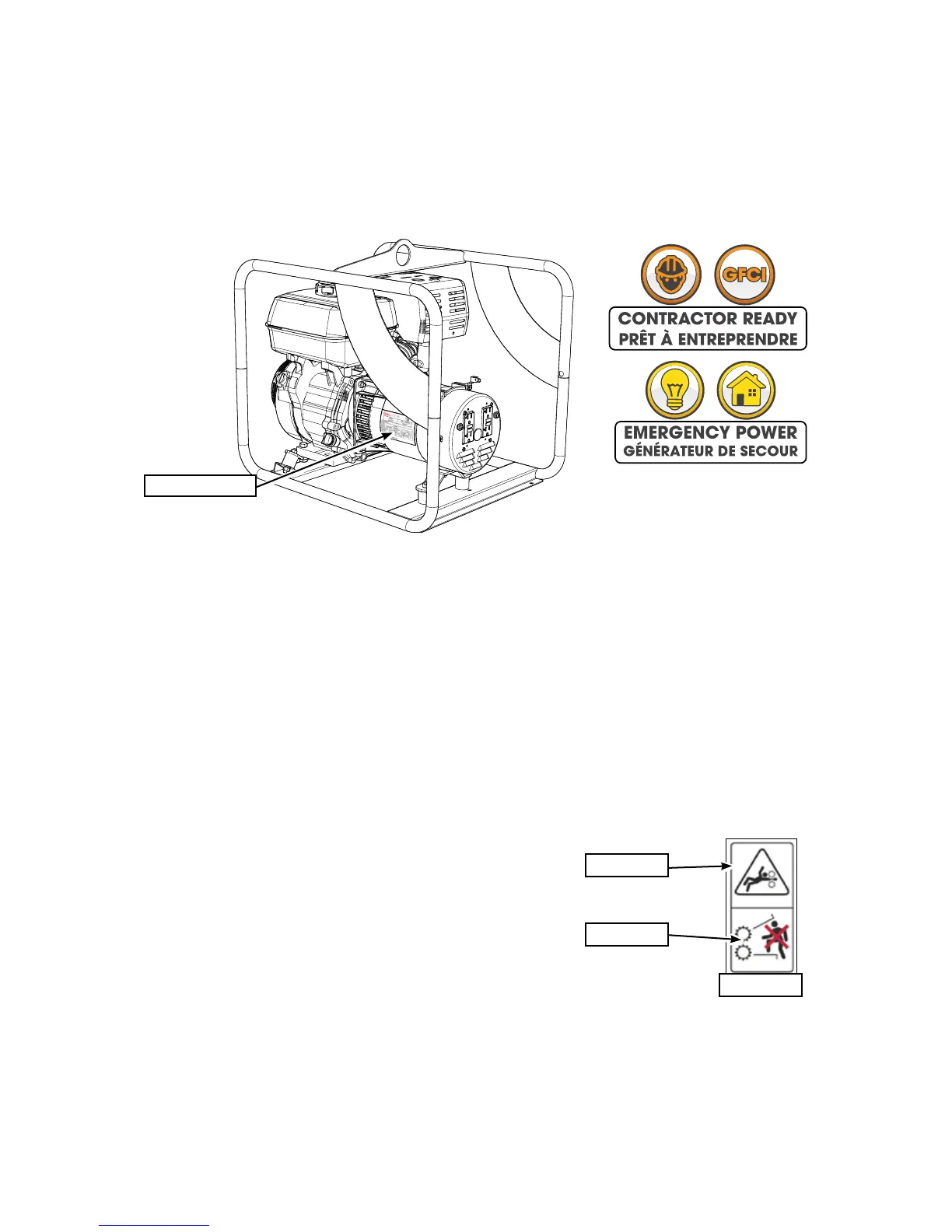
Always reference the serial number of your SurgeMaster generator when ordering parts or requesting ser-
vice or other information.
The serial number plate is located where indicated. Please mark the numbers in the spaces provided for
easy reference. (Serial label location is the same for ALL models)
SERIAL NUMBER LOCATION
Emergency Power Series or Contractor ReadySeries Portable Gas Generator
Model Number ____________________________________________________
Serial Number ____________________________________________________
safety alert
message
safety label
LABELLING INFORMATION
As you begin to get familiar with your SurgeMaster product, you will notice that there are numerous labels
located on the machine. Here is a brief explanation of what they are for and how to read them.
There are three different types of labelling: safety, informative
and product labels.
Safety Labels are pictorial and always with a yellow back-
ground colour and generally 2 panel. The top panel shows the
safety alert (the potential hazard) and the bottom panel shows
the message (how to avoid the hazard).
Informative Labels are generally pictorial, have a white back-
ground colour and can vary to the number of panels. The label
will illustrate the function of a feature and is accompanied by detailed instructions in the owners manual,
with the label illustrated along side.
Product Labels are associated with the product and carry various messages. (model, serial, etc)
See the section on safety signs for safety label denitions. For a complete illustration of labels and label
locations, download the parts manual for your model product at www.surgemaster.ca.
Serial Location


 To Next Page