18
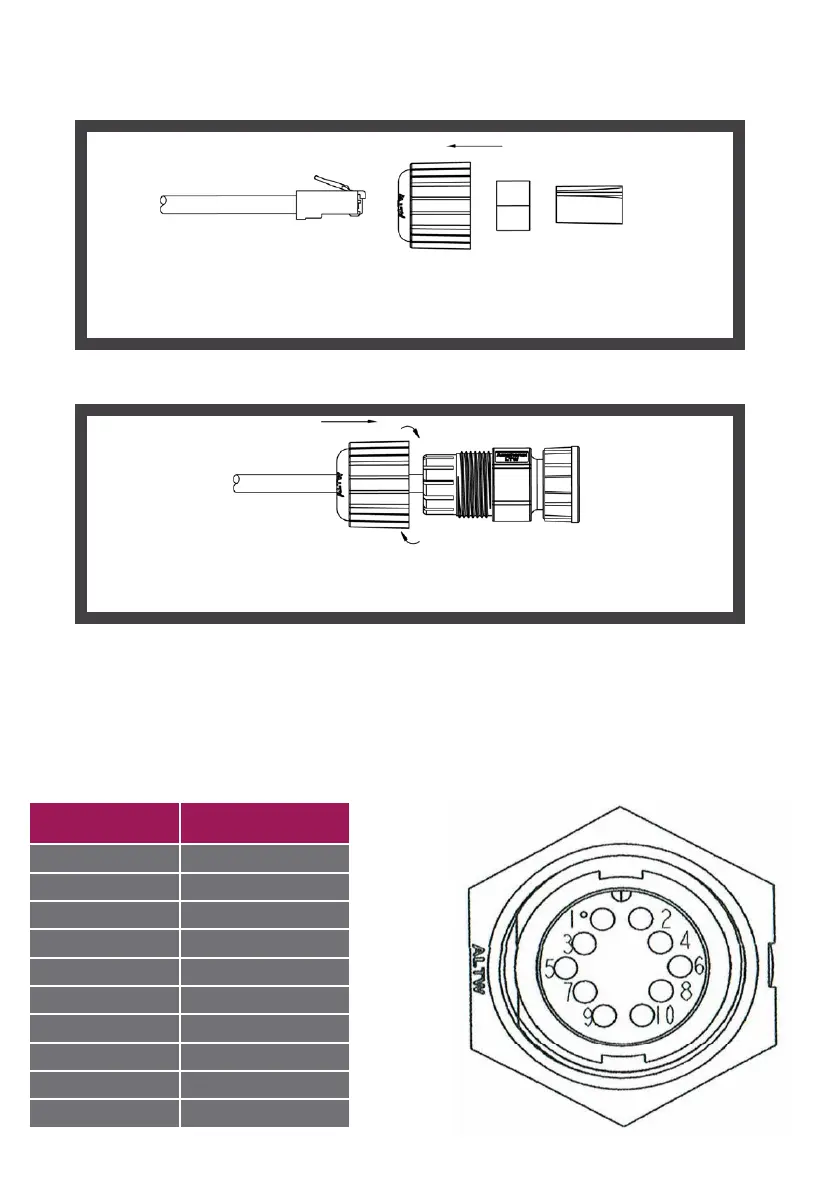
2.2.4 Assembly of AMPHENOL connector
Step 1
Step 2
Fit the waterproof screw, the waterproof joint and the support into the
cable.(Cable of external diameter: between 5.0 and 6.5mm/0.20 and
0.26
’’)
Fit the waterproof screw on the cable end and tighten.
(screw torque: 5~15kgf-cm, this screw torque corresponds to a strong
twisting by hand but without tools)
2.2.5 Diagram of MICROPAK power supply connector
This cable provide SURVISION.
The MICROPAK power supply connecter allows us to connect the camera to other functions
such as the IO In and Out, the RS 485 as well as the connection to a LUMIPAK for additional
illumination. The connection system varies depending on the option chosen for the
MICROPAK.
Pin Fonction
1 24V_IN
2 GND_IN
3 IO_IN+
4 IO_IN-
5 IO_OUT
6 IO_OUT
7 RS485_A
8 RS485_B
9 GND
10 FLASH


 To Next Page