Sutron Corporation X-Link Operations & Maintenance Manual, Rev 1.63 5/24/2016 pg. 28
Pressing the setup status button typically prompts the user to take the next
logical step towards getting the setup in-sync between LinkComm and X-Link,
with recording on.
Note: When the setup displayed by LinkComm is the same as the setup in X-
Link, then we say the setups are “in-sync”. When the setups are not the same,
the setup status button displays a warning sign, and you must send the setup
to X-Link to get the setups “in-sync”.
After making changes to the setup locally, you need to send those changes to X-
Link to bring the setups “in-sync”. You do this by pressing the setup status
button (or by selecting the main menu item, “Send Setup to X-Link”).
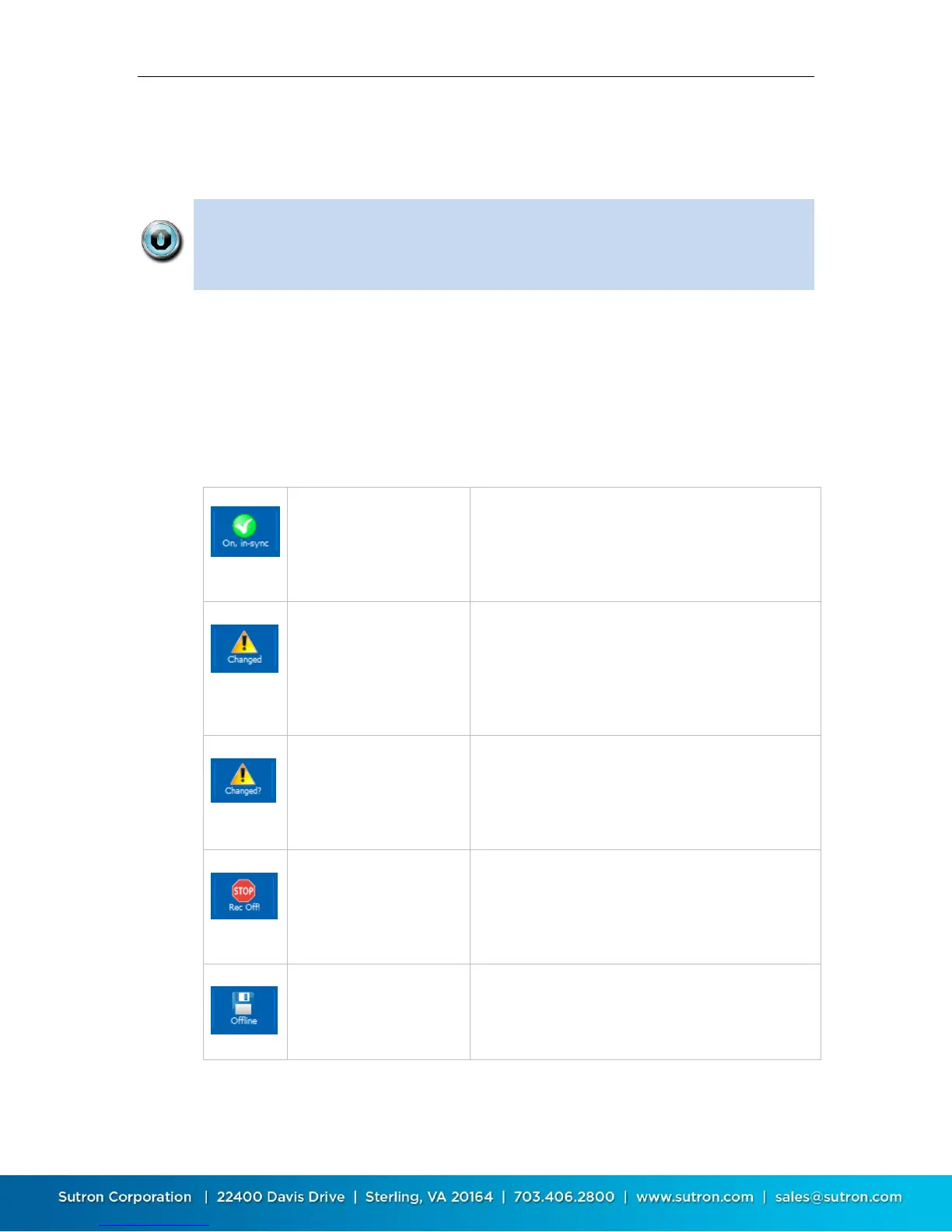
The following table describes the different states maintained by the setup status
button, and describes what happens when you press the button in each of the
states:
LinkComm is connected
to X-Link, recording is ON,
and the setups are “in-
sync”
Press the button to turn off recording. LinkComm
will prompt for confirmation.
A change has been made
to the setup in LinkComm
(it no longer matches the
setup in X-Link)
Press the button to send setup changes to X-Link.
LinkComm will prompt for confirmation. If “Yes”,
only the changes required to be “in-sync” are sent. If
“No”, LinkComm prompts to retrieve the setup from
X-Link, overwriting local changes
The setup in X-Link is
unknown, and so may
differ from the one
displayed by LinkComm
Press the button to send the setup to X-Link.
LinkComm will prompt for confirmation. If “Yes”,
LinkComm first sets the setup in X-Link to defaults,
and then sends the changes required to be in-sync
Recording is OFF in X-Link.
This means no
measurements are being
made
Press the button to turn recording ON in X-Link.
LinkComm will prompt for confirmation
LinkComm is working off
line (not connected to X-
Link)
Press the button to connect to X-Link


 To Next Page