27
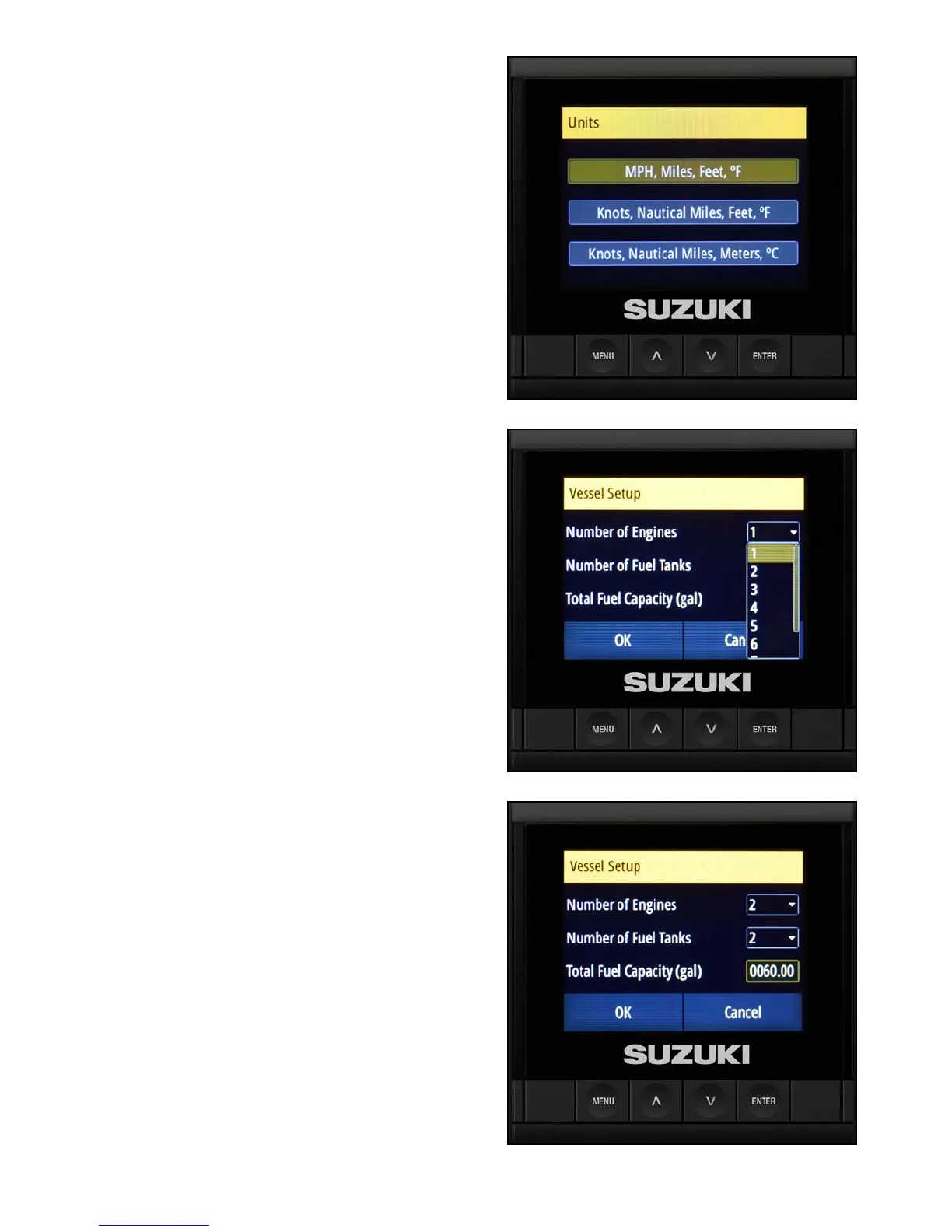
Select the Units to be Displayed
1. On the Units screen, use the arrow buttons to
select how you want units to be displayed on
the C10, then press Enter.
Vessel Set-up
1. On the Vessel Set-up screen, the C10 will
default to 1 engine and 1 fuel tank.
Use the arrow buttons to select the Number
of Engines box. Then use the arrow buttons
to change it to 2.
If the vessel has two fuel tanks, use the arrow
buttons to select the Number of Fuel Tanks
box. Then use the arrow buttons to change it
to 2.
NOTE:
It is possible to select up to eight engines, but only
two engines can be displayed at any time on the
C10 Color Display.
2. Use the arrow buttons to select Total Fuel
Capacity (gal). Then use the arrow buttons
again to set the Total Fuel Capacity and
press Enter.
In this example, the total fuel capacity has
been set to 60 gallons.



 To Next Page