57
3. When “YES” is selected:
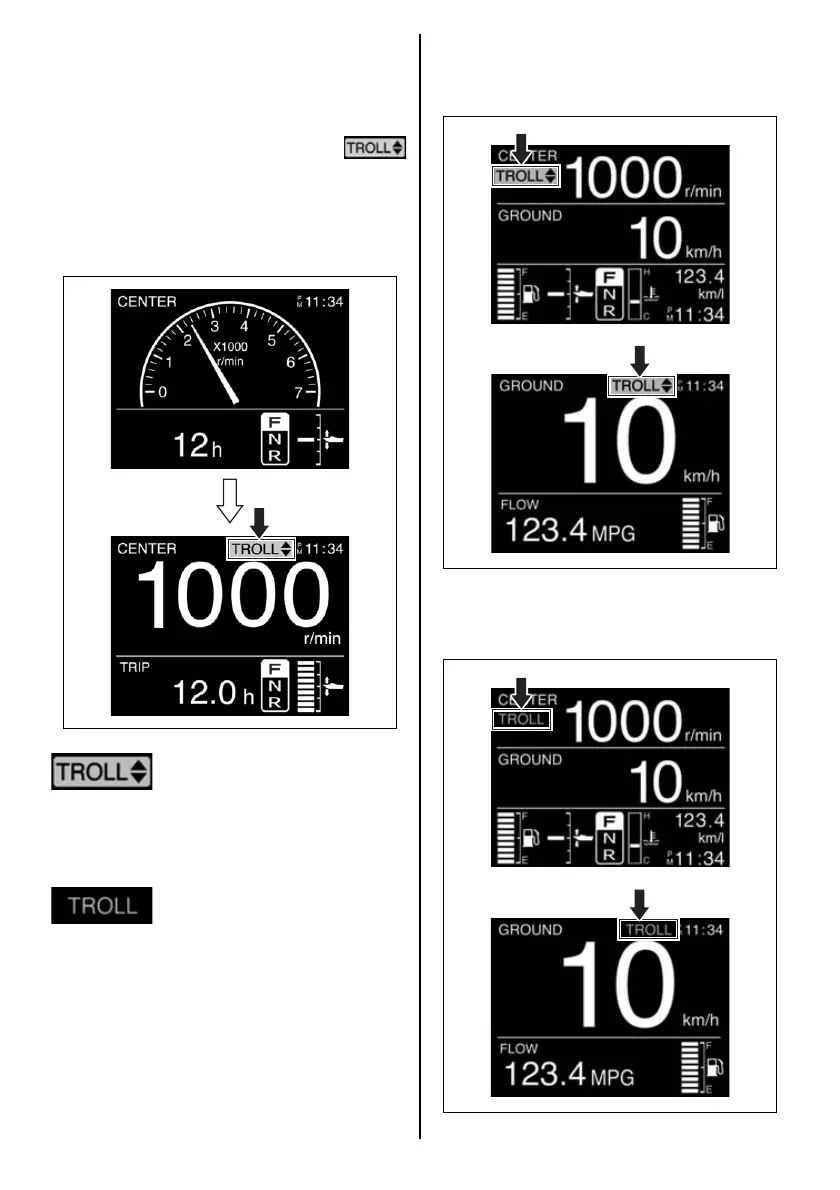
When “YES” is selected and the [SET] but-
ton is pressed, one beep sounds to show
that it is now in TROLL Mode. At the same
time, the screen will change and display the
specific TROLL Mode screen, and
is displayed on the gauge screen. When the
gauge screen displays “Engine Speed
Screen” or “All Items Screen”, the engine
speed screen automatically changes from
an analog to a digital display.
• This icon appears on the
screen of the multi-function
gauge that was operated to
get into the troll mode, and
shows operatable multi-func-
tion gauge of the troll mode.
• This icon appears on the
screen of the multi-function
gauge(s) that did not be oper-
ated to get into the troll mode.
This icon appears on the
screen of the multi-function
gauge(s) that cannot operate
the troll mode.
Example of the troll mode display on the
Mmulti-function gauge that can operate the troll
mode.
Example of the troll mode display on the multi-
function gauge that cannot operate the troll
mode.


 To Next Page