ENG
3
Operation Manual
SPS-820
f
g
i
h
RL
I
O
L
R
a
b
c
d
e
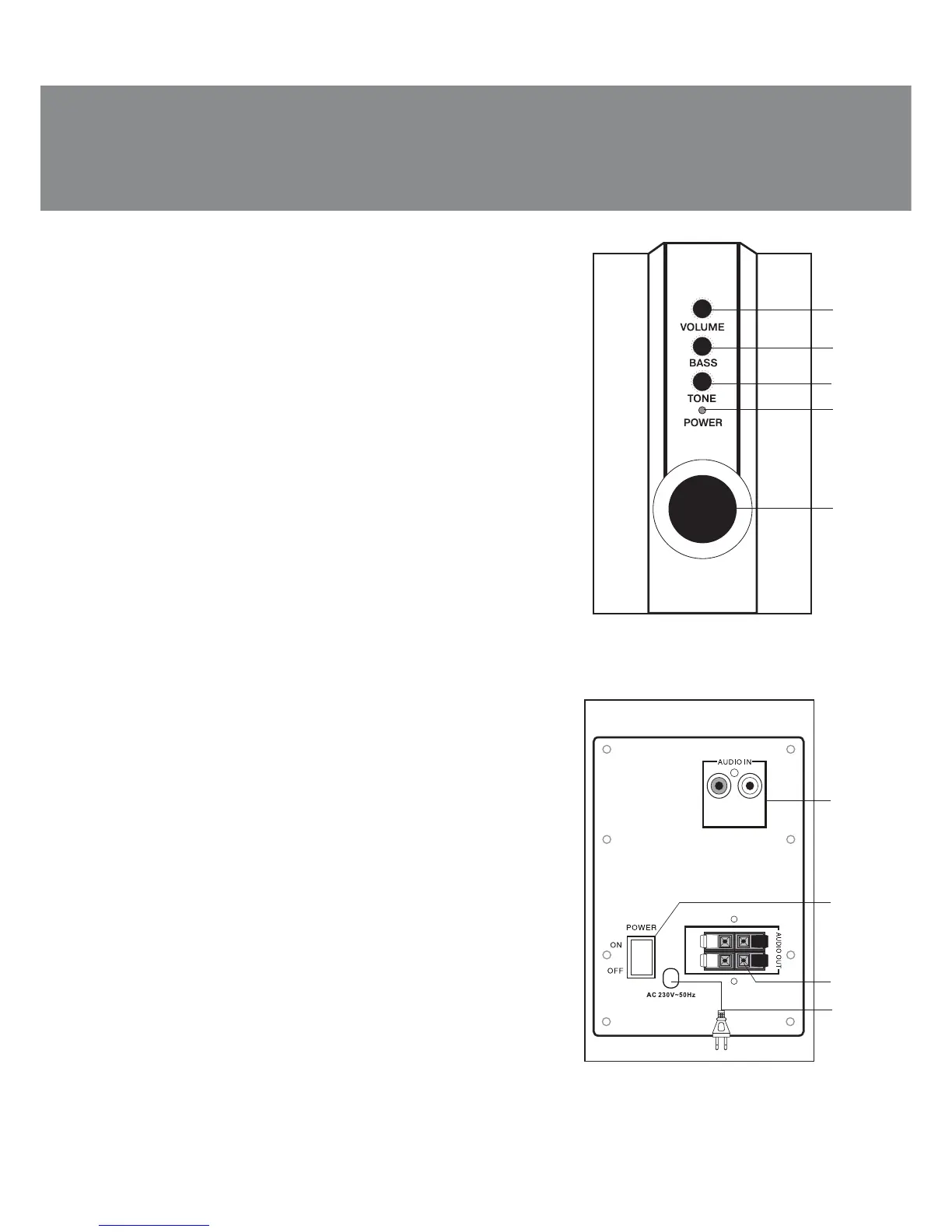
Front and rear control panels of the subwoofer
a VOLUME: master volume control knob
b BASS: subwoofer volume control knob
c TONE: timbre control knob
d Power LED
e Phase inverter
f AUDIO IN: audio source input
g POWER: power switch
h AUDIO OUT: speakers connection terminal
i Power cord
5. PREPARATION AND OPERATION
Speaker placement
• Place speakers symmetrically to the listener at the dis-
tance not less than one meter. Subwoofer emits non-
directional sound, therefore it can be located in any place of
the room, where it will sound to the best advantage.
• Place MSS far away from monitors and TV sets, as insig-
nificant image distortion in these supersensitive devices is
possible.
Installation and operation
SPS-820 Multimedia Speaker System (MSS) can be con-
nected to virtually any audio source (see connection diag-
ram, Fig. 3).
• Before connecting, make sure that the MSS is unplug-
ged. Then connect the built-in audio cables to the audio
outputs on the rear panel of subwoofer (see Fig. 3). Note that
the red «connector» on the right speaker should be
connected to subwoofer red terminals (AUDIO OUT R), and
the white «connector» of the left speaker – to the white plug
the subwoofer (AUDIO OUT L).
• RCA-jacks of stereo signal cable should be inserted to
input connectors R and L (AUDIO IN f) of subwoofer, and
mini-jack of cable should be plugged in Ø 3.5 mm LINE OUT
port of the computer sound card or audio output of player,
see Fig. 3.
Note. Check the fixation wires in the terminals,
matching polarity and lack of circuit of wires between
themselves and with metal parts of equipment. To
connect the speakers to the DVD/CD-players should be
used a stereo signal cable 2RCA to 2RCA or mini-jack to
2RCA (not included).
Fig. 2. Rear panel
Fig. 1. Front control panel



 To Next Page