15
3.2.3 TCP/IP Parameters Configuration
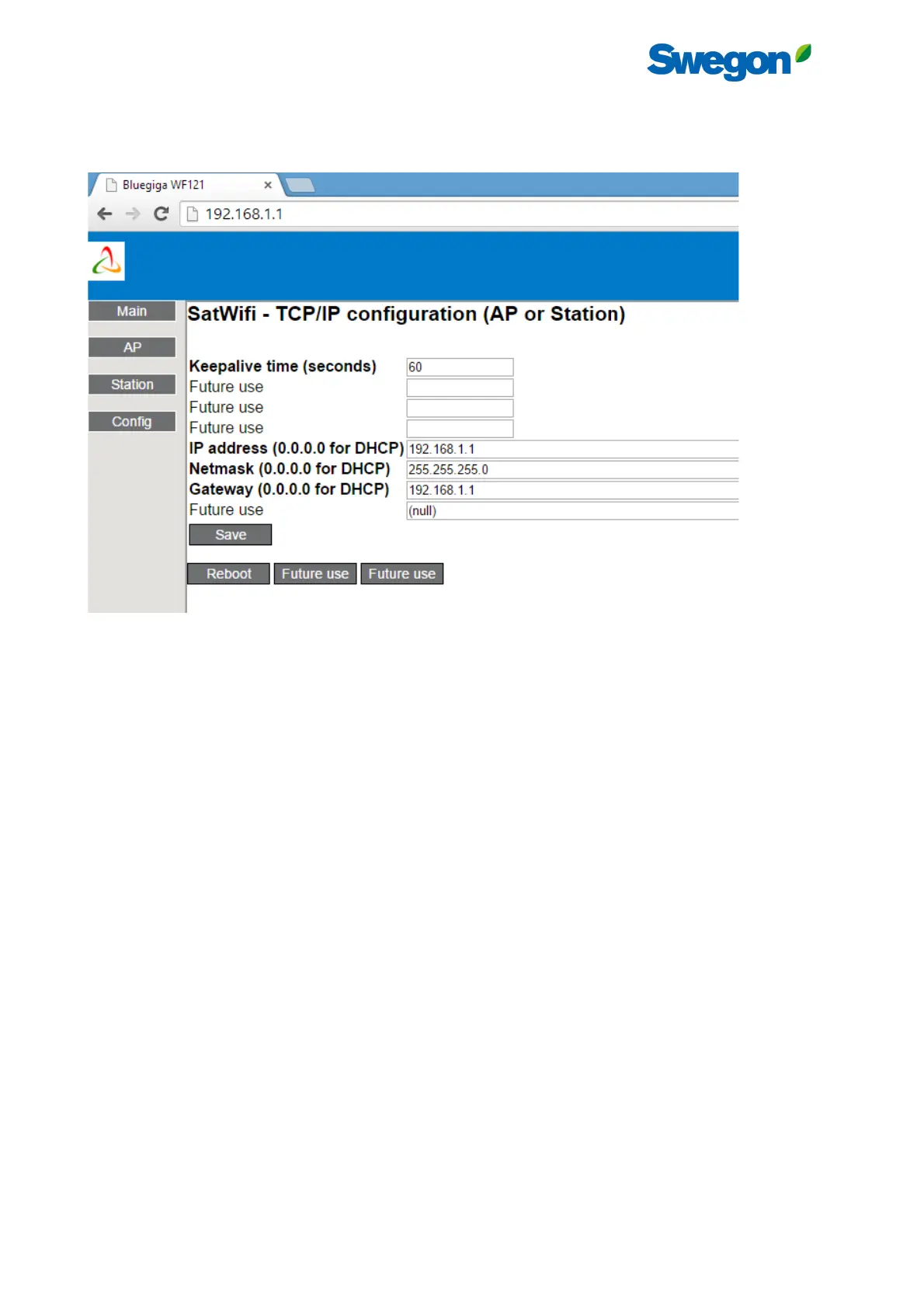
Press “Config” button in the left menu to configure the TCP/IP parameters of the SAT WIFI (both AP and station).
Figure 15 - SAT WIFI configuration Web Server - TCP/IP Configuration Page
- If the SAT WIFI is an Access Point, enter the parameters as in Figure 17.
- If the SAT WIFI is a station of a Wi-Fi network
o with DHCP server (dynamic IP address assignation), enter the value 0.0.0.0 for IP address, Netmask
and gateway fields.
o without DHCP server, enter that value in the IP address field and also the netmask and gateway.
These values should be provided by the local network administrator.
Press then the “SAVE” button.
Once the configuration is done, press “Reboot” button and wait 2 minutes. The changes will be applied after the reboot.
3.2.4 Connecting a client application to Access Point SAT WIFI
On the device where the client application runs, select the Wi-Fi network with the SSID of the SAT WIFI Access Point.
The client should now be able to connect to the IP address configured at point 3.2.3 at port number 502 or, alternatively,
to obtain automatically the IP addresses of all the SAT WIFI available on the network thanks to the «Discovery» feature
(see point 4).
Under normal conditions, the signal quality should be good at 20 m from the unit. If the signal is not enough strong at a
location from where the application would be normally used, one of the following solutions should strengthen the signal:
1. Use of an antenna extender 1,25 m length with a SMA-female connector that will be connected to the antenna
and a SMA-male connector at the other extremity linked to the SMA-female connector of the UFL-SMA cable.
2. Use commercial Wi-Fi repeater.
3. A combination of the 2 solutions for very particular situation.
3.2.5 Connecting a client application to station SAT WIFI
The device where the client application runs must be connected to the same Wi-Fi network than the SAT WIFI. The client
should now be able to connect to the IP address configured at point 3.2.3 at port number 502 or, alternatively, to obtain
automatically the IP addresses of all the SAT WIFI available on the network thanks to the «Discovery» feature (see point
4).



 To Next Page