©2018 SwellPro All Rights Reserved
09
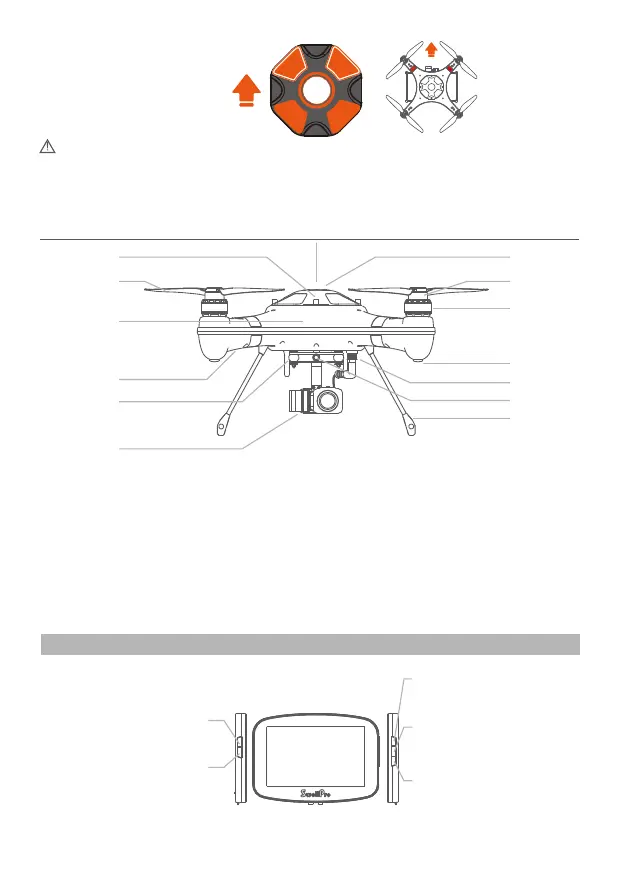
Nose Direction
[01] Cover/hatch screw
[02] Quick release carbon fiber propeller
[03] Nose direction
[04] Flight Indication Lights(Front: 2 X Green, Stern
Lights: Normally Green, or Red/Yellow, indicating status)
[05] Gimbal damping ball
[06] Waterproof gimbal and camera
[07] Landing gear
[08] Gimbal quick release screw
[09] Waterproof cable plug/socket
[10] Rubber foot
[11] Waterproof brushless motor
[12] Propeller Attachment system
[13] GPS top cover/hatch
Power Button
Auto powers on the FPV screen,
but can be manually powered off.
Remote Controller Illustrations
[01]
[03]
[02]
[04]
[05]
[06]
[19]
[07]
[09]
[08]
[10]
[11]
[12]
[13]
Channel / Decrease (-)
Manual channel Selection /
Decrease value
Before closing the GPS Top cover, please ensure the watertight gasket and the sealing
surfaces on the drone fuselage are in good condition and are free of dirt, sand or any
other contamination. So as to avoid sand & other foreign materials which will
significantly and adversely influence the integrity of waterproof seal on the Splash
Drone.
Auto search/Menu Select
Use the auto search function to select
the most suitable channel / Switch
between the different menus
Band / Increase (+)
Manual band Selection / Increase
value
Menu / Menu Selection
Enter into the main menu/ Shift
between the various menus














 To Next Page