©2021 Swellpro Technology Co., Limited 37
USB: Remote control firmware upgrade interface
Ethernet Network port: This supports the development of computer ground station software to
control the aircraft and its airborne equipment and access flight telemetry.
Remote control Pairing
The remote control and drone share a security code to pair their radios.
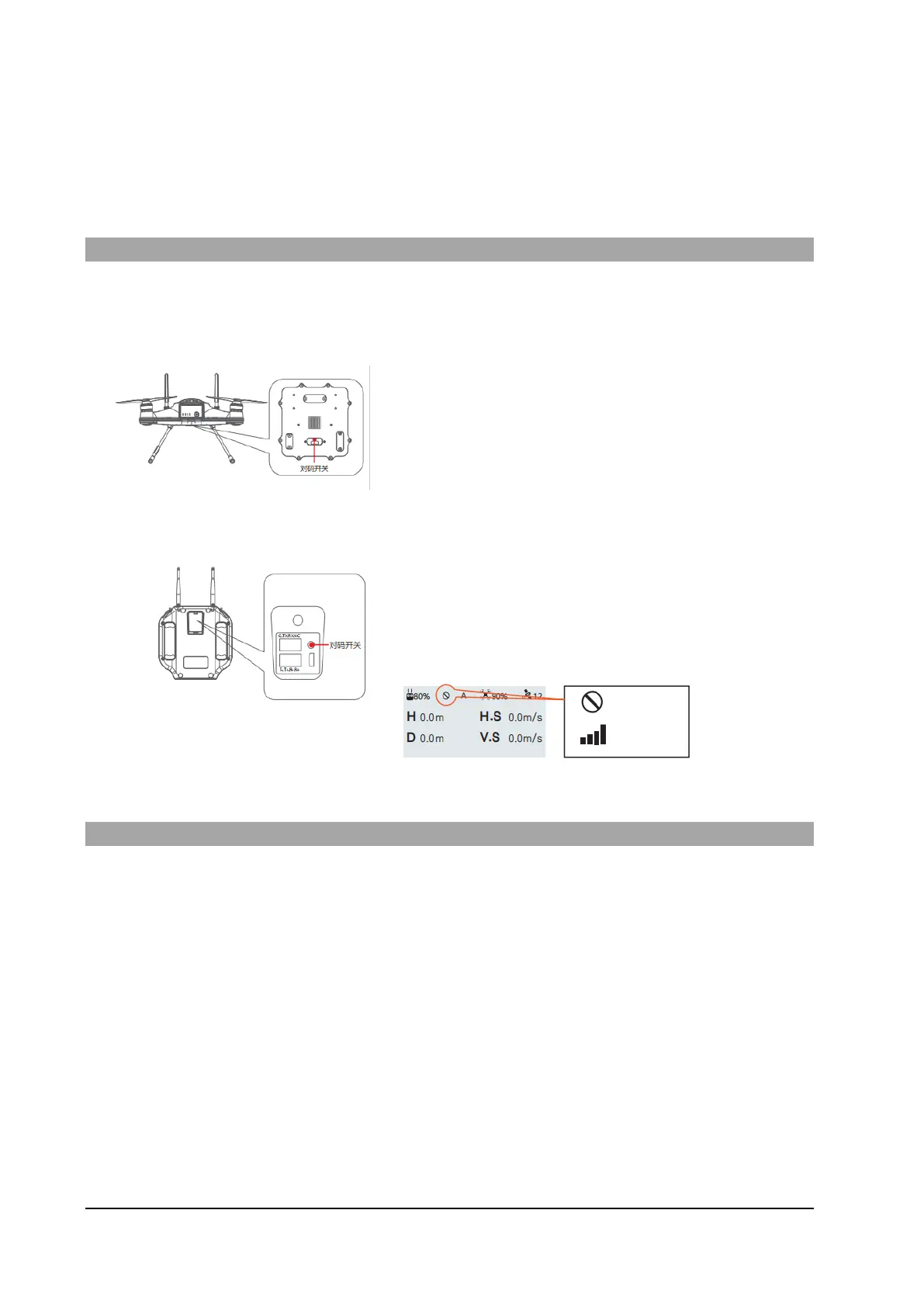
Should you need to re-pair the remote control with the aircraft, follow these steps:
1. Remove the screws from the aircraft's USB
connector and open the waterproof cover.
2. Power on the remote control and then the
aircraft.
3. Wait for initialization to complete.
4. With a small tip or other blunt object, press the pairing button on the aircraft for 10
seconds.
5. Press the remote-control pairing button
6. The signal icon is displayed on the remote control to
indicate that the pairing is complete.
Setting the Wi-Fi Password
There are two ways to reset your Wi-Fi password:
1. Aircraft, remote control each press 5 times the code key, Wi-Fi password reset, this operation
aircraft and remote control do not need to re-code;
2. Remote control continuously press the code key 5, Wi-Fi password reset, at this time the
aircraft and remote control need to re-code. After resetting your password,
The Wi-Fi password is restored to the default, 12345678.



 To Next Page