10
11
ENGLISH
FILLING
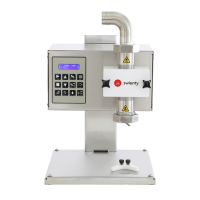
When the machine is turned on, the display shows the settings that have been used for the last
lling.Pressthe[START]buttontobeginlling.Furthermoreyoucanstartthemachinewithan
externalstartimpuls,e.g.theincludedfootpedal.Inthebeginningthellingamountis0andit
then counts up to the set amount.
After that the motor stops immediately, takes a short break TIMEADRIP (se parameters) and
shortly rotates backwards.
Thispreventsthemachinefromdrippingafterthelling(seeantidripfunction[ANTIDRIP]).
Ifyouwanttoincrease/decreasetheshownamount,pressthe[+]/[-]buttons.Thellingamount
blinks on the display.
When you have reached the desired amount, press the [ENTER] button. Now this amount is
connected to the program until you set it again.
ANTIDRIP
Aproblemwithtoughliquidslikee.g.honeyusthattheycancontinuedrippingafterlling.To
preventthisfromhappening,wehavedevelopedaspecialrubbernozzlethatminimizesthis.
At the same time the motor rotates backwards for a short time to suck a small amount back in.
This amount depends on the consistency of the substance.
Press [ANTIDRIP]. The number blinking on the display stands for the return pulses. With the
[+]/[-]buttonsthenumbercanbechanged(thehigherthenumber,themorebackow).Save
with [ENTER]. If the number is too low, then the machine drips, if it is too high, then the machine
sucksintoomuchair.Withthenextllingtheairwillthenloudlybepressedoutagain.
CALIBRATION
Tomakesurethattheamountshownonthedisplaymatchedthelledamount,themachine
needs to be calibrated.
Do a testrun anf measure it on a calibrated scale. If the display shows e.g. 500g but the scale
measures 520g, the value from the scale needs to be transfered to the machine.
With the [+] button you set the value to 520. The number blinks. Instead of saving with [ENTER],
you need to press [CALIBRATE]. The number on the display jumps back to 500g. Now the machine
is calibrated (in some cases this process needs to be repeated a few times).
MOTOR’S SPEED REGULATION
In some cases it can be necessary to regulate the pump capacity and thus the motor’s speed.
Press the [SPEED] button. The speed setting blinks. Using the [+]/[-] buttons you said the desired
speedinpercentage.Savebypressing[ENTER].Canbesetin5%intervals.
Thspeedregulationcanalsobechangedwhilethemachineisllingorpumping.Inconnection
with a turn table it can be neccessary to decrease the speed to be able to follow along.
PUMPING
When the machine should be used as a pump, press [PUMP/FILL]. To change the pump direction,
press [DIRECTION]. The arrow on the display now points in the opposite direction.
Press [START] to start the pump. The pump amount starts at 0 and then counts up. To stop the
pump press the [STOP/BACK] button. The pumped amount blinks on the display. If you want to
continue pumping, press [START], then the machine begins to pump again and the pump amount
counts further up.
To reset the pump amount, stop the machine and press [STOP/BACK] again.



 To Next Page