26
27
ENGLISH
MENU
PARAMETERS
Hereyoucanchangetheparametersofthellingmachine’s
20 programs (these parameters are saved for each program
number individually).
Press [ENTER], P(1-20) is shown. Tha last used program number blinks.
Press [+]/[-] to change the program number, then press [ENTER] to see
the parameters for the chosen program number.
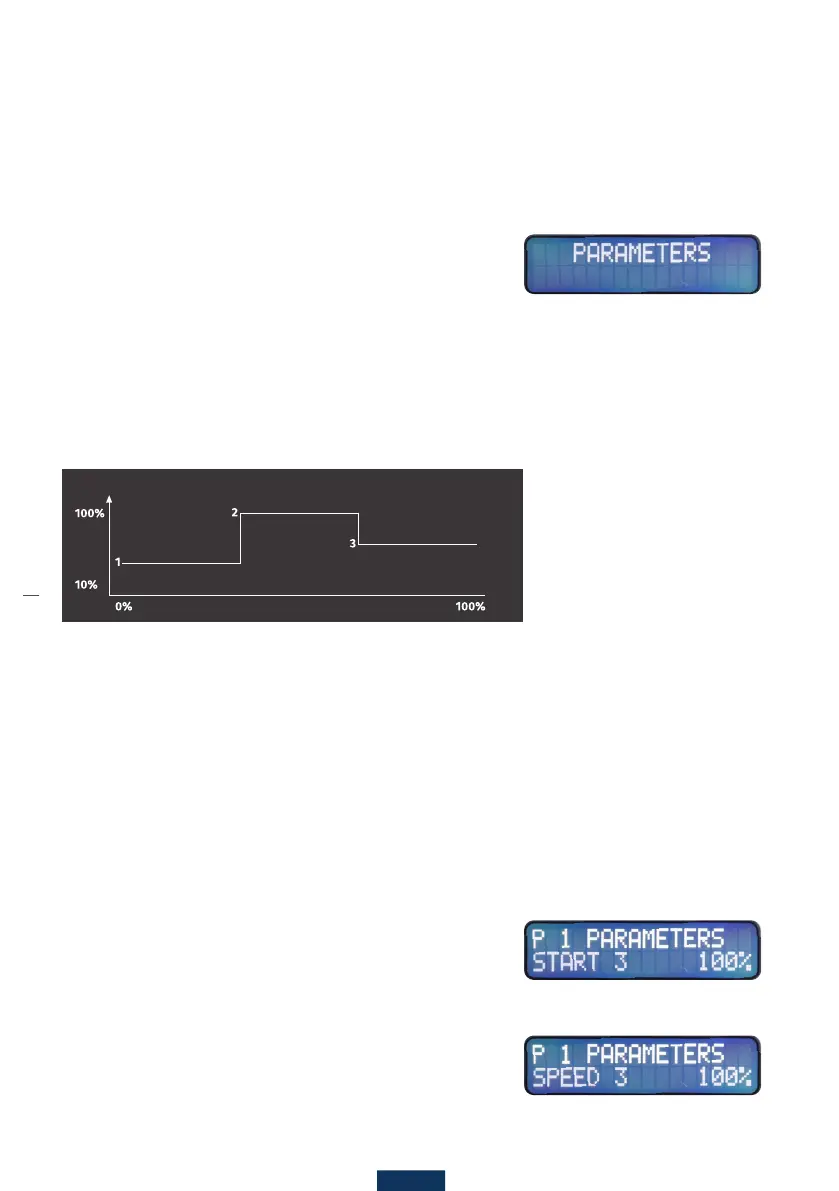
Special program speed (use for containers where you would like an automatic
changeofspeedduringlling,typicallyforsubstancesthatfoamalot).
.
Speed 1 -(canbesetfrom10%to100%instepsof5%(Factorysettingis100%)).
Thisparameterdeterminesthemotor’sspeedduringllingifparametersSTART2
andSTART3aresetto100%,otherwisethisparameteronlydeterminesthestart
speed until parameter START 2 or START 3 amount are reached.
This parameter can also be set directly by using the [SPEED] button.
Start 2 - Determines when the motor’s speed should be changed
toparameterSPEED2.START2canbesetfrom1%to100%ofthe
entirelingamountinstepsof1%(Factorysettingis100%).
Speed 2 - Determines the motor’s speed after amount START 2
has been reached.
Start 3 - Determines when the motor’s speed should be
changed to parameter SPEED 3. Only use for containers where
youwouldlikeanautomaticchangeofspeedduringlling.
START3canbesetfrom1%to100%ofthetotalllingamount
instepsof1%(Factorysettingis100%).
Speed 3 - Determines the motor’s speed after amount START 3
has been reached.
Under the [MENU] button there are a few parameters and settings which can be used for special
circumstances. If you press that button, “PARAMETERS” blinks on the display. With the [+]/[-] but-
tons, you can jump between “LOG”, “LANGUAGE”, and “RESET” (see funktions diagram).
START 2 START 3
Speed



 To Next Page