65
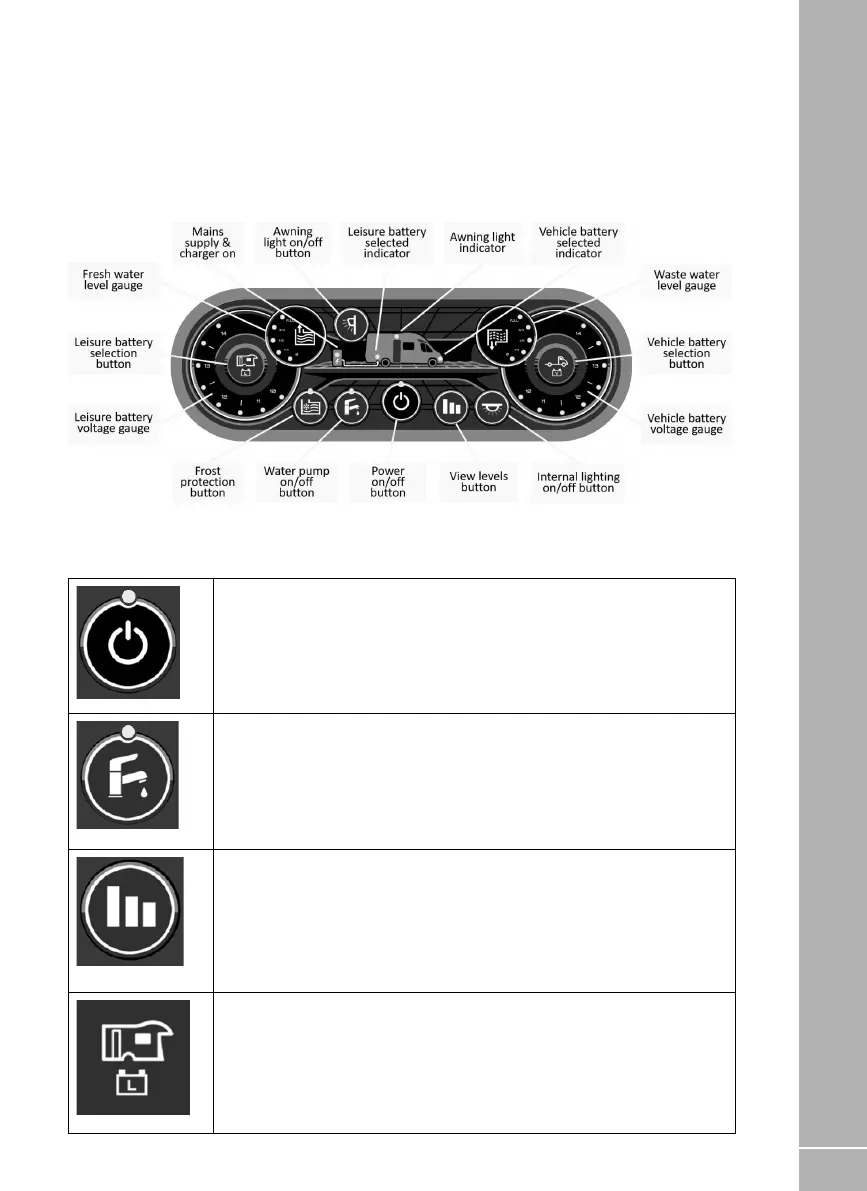
8.6 Control Panel - Component
Layout
Your control panel will have an appearance as
below, but depending on your specification of
the vehicle the control panel features will vary.
Not all features are present in all vehicles.
Power Button. Press the power button to turn the leisure power on. Press
the button again to turn the power off. The adjacent indicator will illuminate
when the power is on, and also the voltage of the selected battery will be
displayed on the voltage gauge.
Pump Button. With the power on, press the pump button to turn the water
pump on. Press the button again to turn the pump off. The adjacent indicator
will illuminate when the pump is on, and also the level of the water tank will
be displayed on the water gauge (if a tank with level sensor is fitted)
View Levels Button. To display the battery voltage levels and the water tank
levels on the control panel gauges, press the levels button. The display
will remain illuminated for 10 seconds. It is possible to lock the display ‘on’
to allow continuous display. This can be achieved by pressing and holding
the view levels button for 2-3 seconds until you hear a beep. To turn this
locked feature off, either press and hold the view levels button again for 2-3
seconds or turn the power off and back on.
Leisure Battery Button. To select the Leisure battery as the source of power,
press the leisure battery select button. The Leisure battery indicator with
then illuminate, confirming the selected battery. Note: By default, the leisure
battery is selected as the source of power (if no mains supply is available), or
as the battery to be charged (when a mains supply is available).
8.7 Control Panel - Key Features
ELECTRICAL SYSTEMS
EC463 Control Panel






 To Next Page