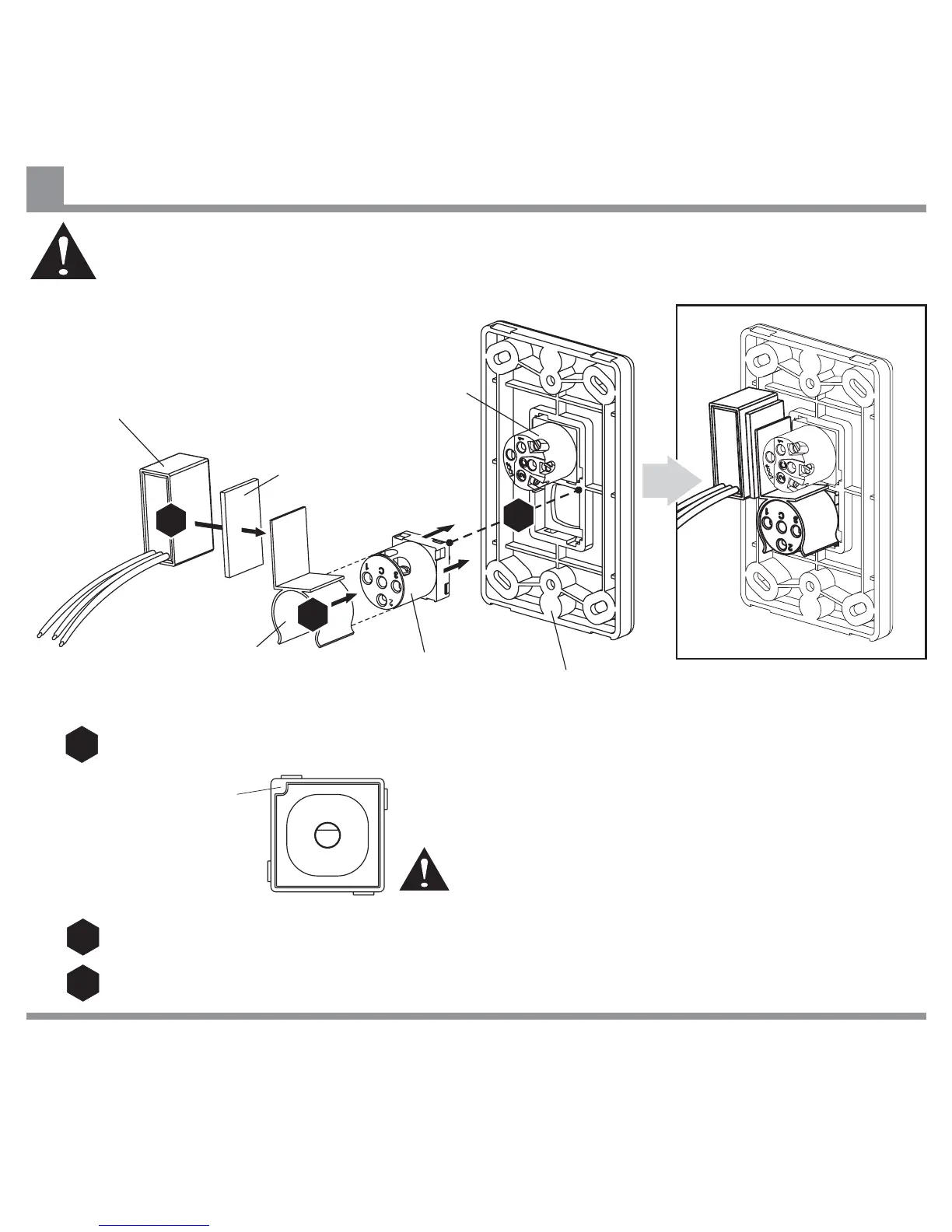
Attach Speed Controller to Back Plate.
Ensure that Orientation Mark is in top left corner, (viewed
from front), and numbers are oriented as shown.
Note: Back Plate, Face Plate
and ON/OFF Switch are not
supplied with fan.
Attach Capacitor to Clip using Double Sided Tape supplied.
Attach Clip to body of Speed Controller as shown.
Capacitor
0
1
2
3
Double Sided Tape
ON/OFF Switch
Clip
Orientation Mark
Back Plate
Speed
Controller
IF THERE ARE ANY PROBLEMS DURING INSTALLATION OF THE FAN, THE INSTALLER MUST CONTACT THE
HUNTER PACIFIC INTERNATIONAL WARRANTY LINE . TEL: 1300 360 280BEFORE LEAVING THE WORK SITE
Warning: Do not attempt to control the operation of this fan from any wall controller that is not
approved by Hunter Pacific International Pty. Limited for use with this fan. Do not use a solid
state wall controller. The use of an unapproved wall controller voids the warranty.
Installing Wall Controller
14
1
1
2
2
3
3


 To Next Page