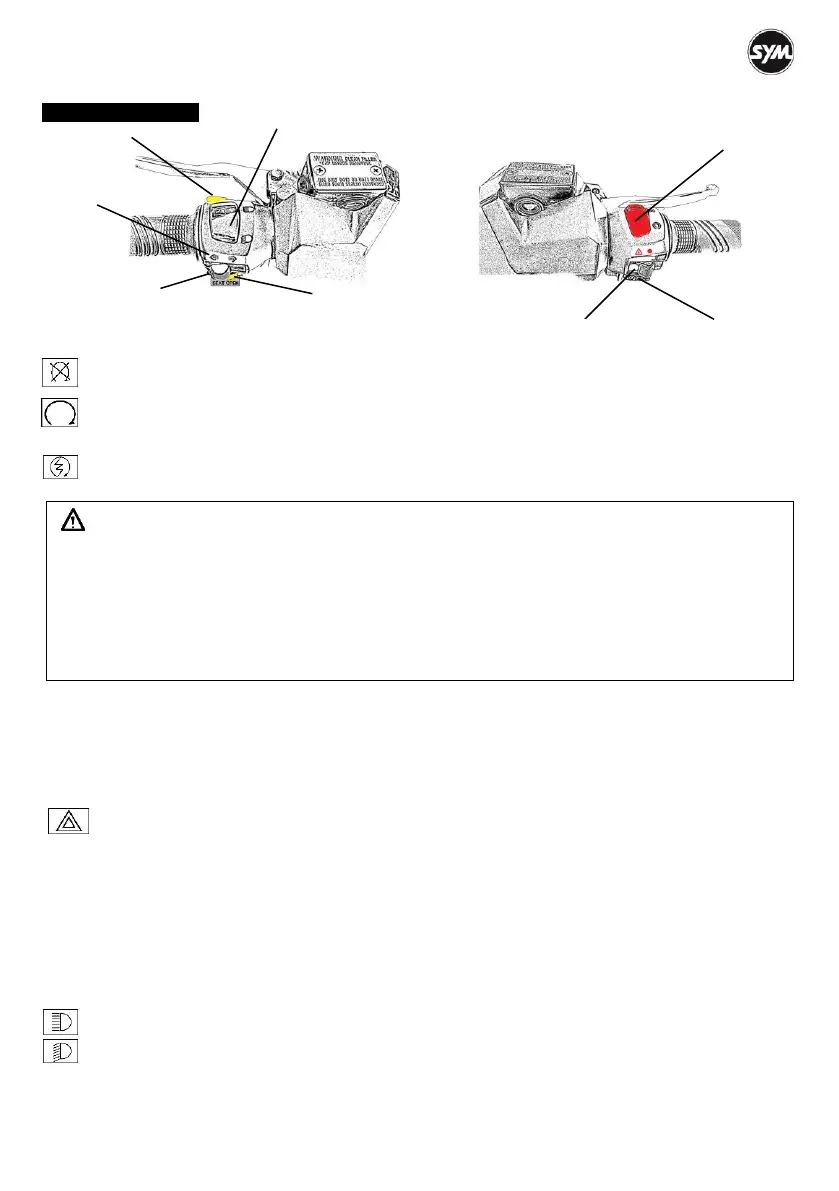
USE OF BUTTONS
Engine Stop Switch
Switch to this position to turn off the engine when a state of emergency.
Switch to this position and the engine can be started.
Electrical Starter Button
This is a starting motor button (switch) for engine starting. With the main switch “ON”, press this
button while holding the front or rear brake lever will start the engine.
CAUTION:
Release this button immediately after engine running, and never press the button again to avoid
damaging the engine.
This mechanism is a safety design. The engine can only be started after the front or rear brake
lever has been applied.
Do not use light system. Turn headlight and signal lights to the “OFF” position when the engine is
being started.
If the side stand is put down, the engine will stop immediately.
Retrieve the side stand before starting the engine.
Automatic Lighting Connections Turn main switch on “ON” , at the same time, the electrical connections
of lights will be connected automatically, including position light、low beam headlights、rear position lamp
and rear-registration plate light. They cannot be switched “ON” or “OFF” individually, on the contrary, those
above lights will be turned on simultaneously.
Hazard Warning Switch
With the ignition switch in the〝ON〞position, this hazard switch with triangular symbol can be
operated. When this button is pushed, all four indicators (front and rear-right and left) begin to blink
simultaneously, and direction indicators on the instrument panel also flash.
When you are experiencing a sudden vehicle problem in the middle of traffic or the vehicle has broken
down, switch on the lights and slowly pull over, keep the lights flashing till the problem is solved. Pressing
the hazard switch again cancels this feature. The hazard lights only can be switched off when the main
switch is in the〝ON〞position.
High/Low Beam Switch This is the high and low beam of headlight master switch. Press this switch to
swift between high and low beams.
This is for high beam.
This is for low beam. (Please turn to low beam when riding in city)



 To Next Page