-3-
Note: charging input voltage must be 5V (input
current 2A shall be accurate, input current size
will directly affect charging time), The change
of charging indicator light shall prevail light
shall prevail.
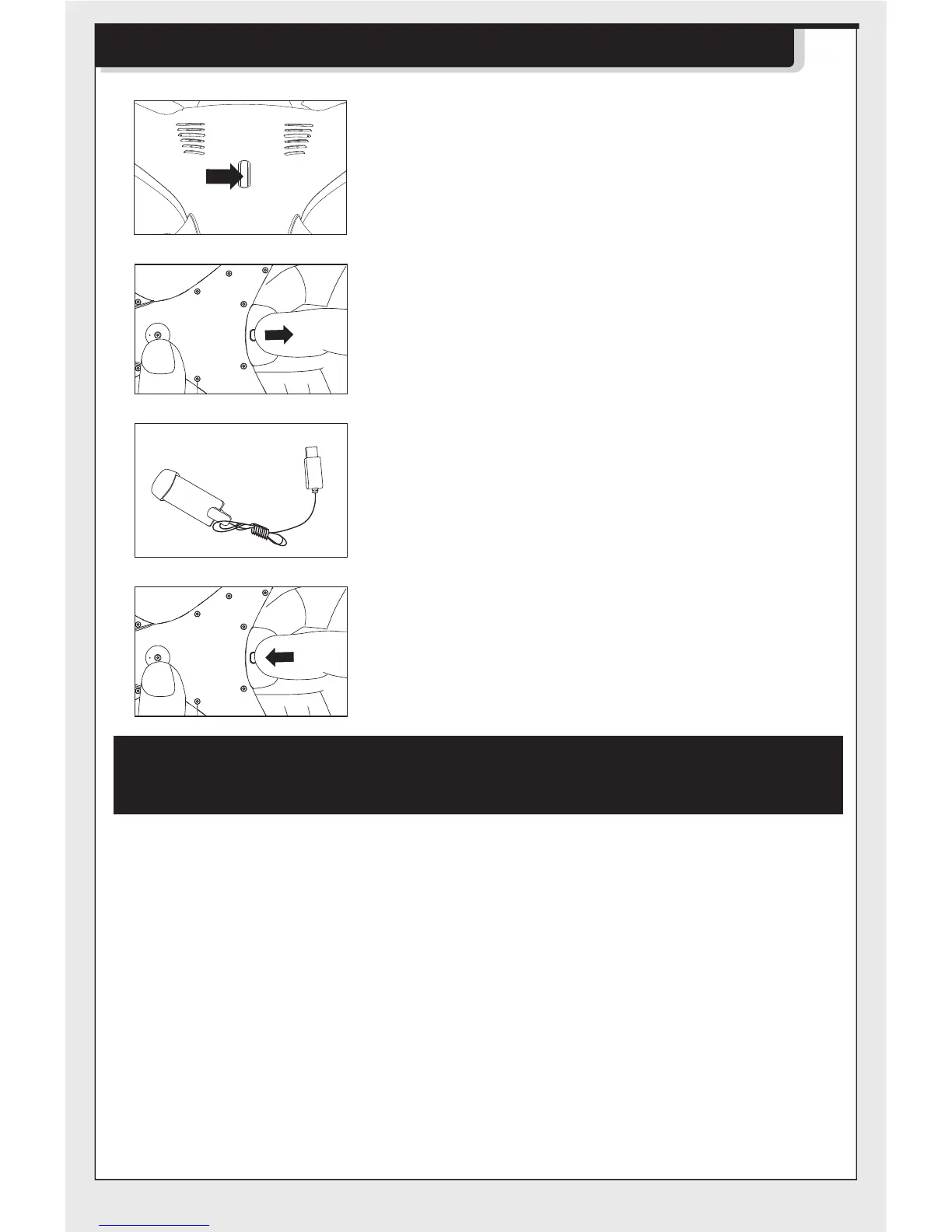
1.Press the power button on the top of the
drone to make sure the drone is turned
“OFF”.
2.Press the fixed components at the bottom
of the battery and pull out the battery.
4.After charging completed, replace the
battery into the drone.
Precautions as follows during charging of battery:
- Avoid placing the active batteries in places with direct exposure,
sunlight and high temperatures. For example, naked light or electrical
equipment installations; otherwise it may cause damages or explosions.
- Avoid immersing the batteries in the water. The batteries shall be stored
in a cool and dry place.
- Avoid dismantling the batteries.
- During the charging of battery, avoid leaving the charging place.
- Rechargeable batteries are to be removed from the toy before being
charged.
- Rechargeable batteries are only to be charged under adult supervision.
- Exhausted batteries are to be removed from the toy.
- Caution:Risk of explosion if battery replaced by an incorrect type,dispose
of used batteries according to the instructions.
The charging time is about 120 minutes; Hover flight time
is approximately 8 minutes.
3. Align the charging head of the USB charging
cable with the charging port of the battery
and clamp it.
Battery Changing and Charging Methods for Drone


 To Next Page