-2-
Protective Gear’s Installation Methods
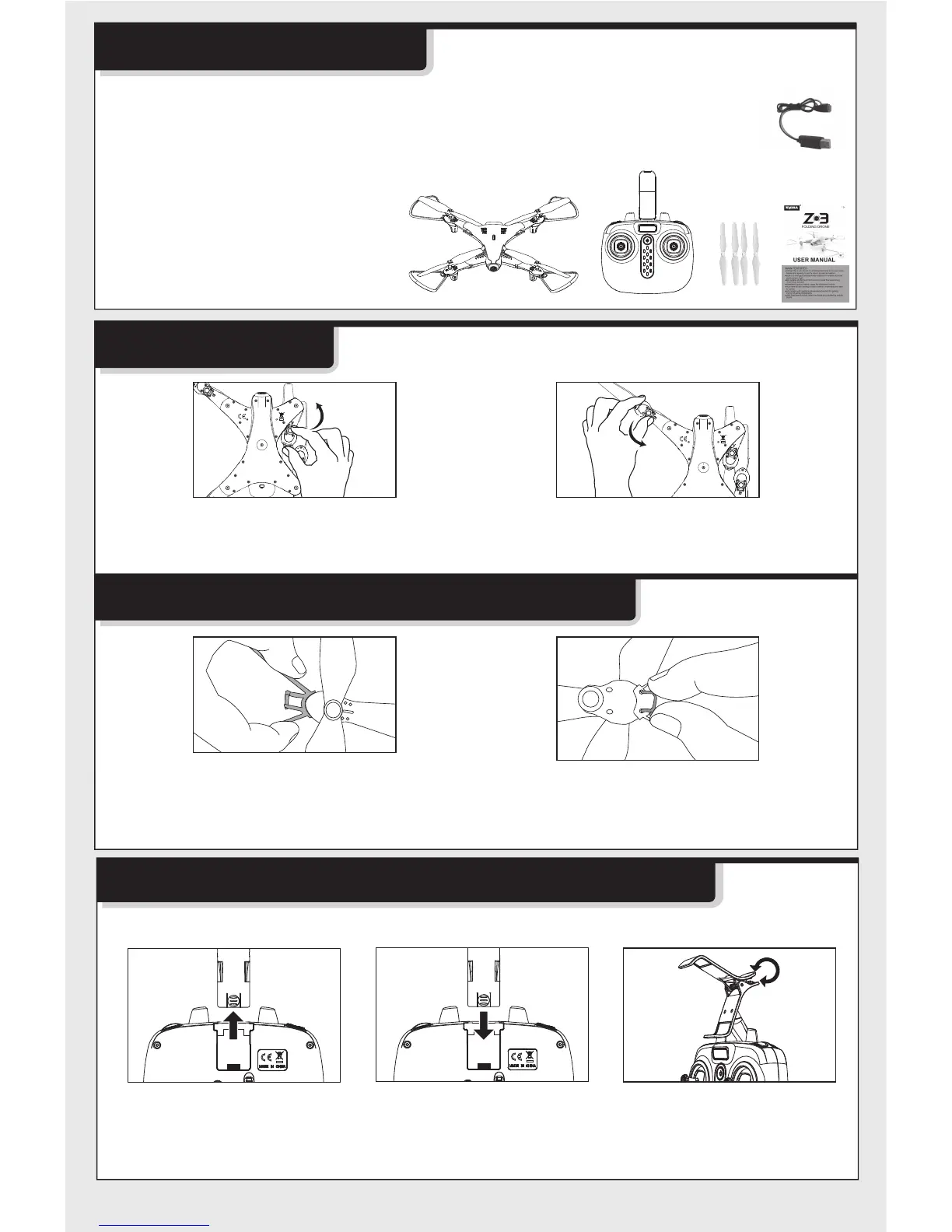
Fold operation
Installation of Mobile Phone Retaining Clip
Package description
●Drone
●Remote Control
●User Manual
●4 Blades
●Charging Cable
●4 Protective Gears
●Mobile Phone Retaining Clip
2. Insert the fixed rods on the protective
gear into the two sockets in the arm of
the drone as shown and fix them tightly.
1. Insert the protective gear into the
arm of the drone as shown.
1.Pull up the phone clip
cover from behind the
remote control.
3. Press the handles to
adjust the jaws.
2.Insert the phone clip
holder into the
connector at the top
of the remote control.
Mobile phone retaining clip’s attachment method:
2. Manually fold the arm in the direction
of the arrow until it is fully folded.
1. Manually extend the arm in the
direction of the arrow until it is fully
extended.
The following items can be found in this product package:


 To Next Page