-4-
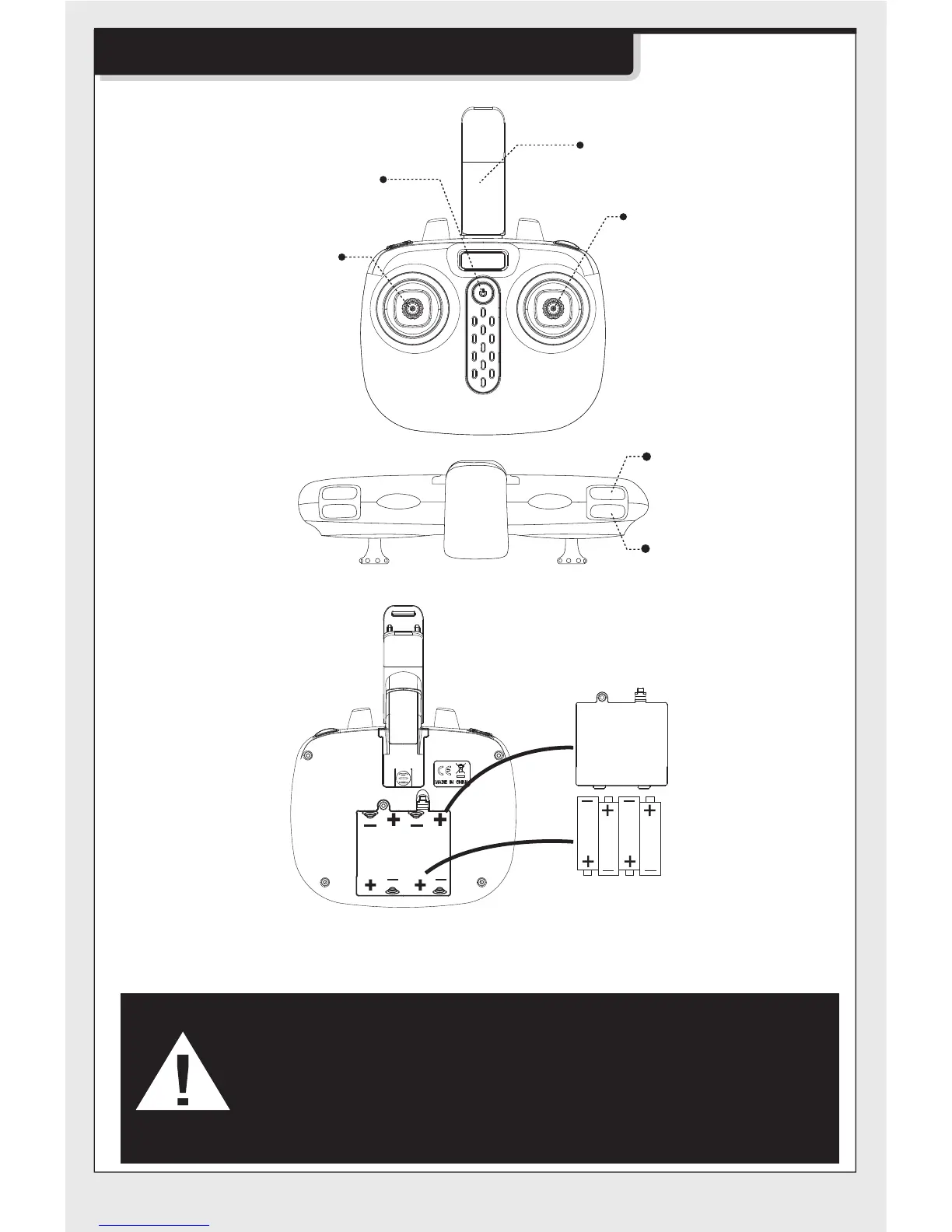
Understanding your remote control
Mobile Phone
Retaining Clip
Power ON/OFF
Right joystick
Press and hold to
enter/exit headless mode.
Press to change high/low
speed.
Left joystick
Keep pushing in until
trimming control finished.
To clear all the trimming
setting,keep pushing
and press the power
button at the same time.
Remote control’s button function description:
360°Stunt flip
Auto take-off and landing
Battery installation for remote control:
Battery cover
4 x AA Batteries
Battery Installation Method: Open up the battery cover at the back of the
remote control. Correctly place 4 x AA alkaline batteries in the battery box
in strict adherence to the polarity instructions ( batteries are not included).
1. During the battery installation, it must be ensured that the
polarities of the batteries are matched with that of the battery
box. No battery shall be installed with the opposite polarity.
2. Please do not use new and old batteries together.
3. Please do not use different types of batteries together.
4. Do not use rechargeable batteries.


 To Next Page