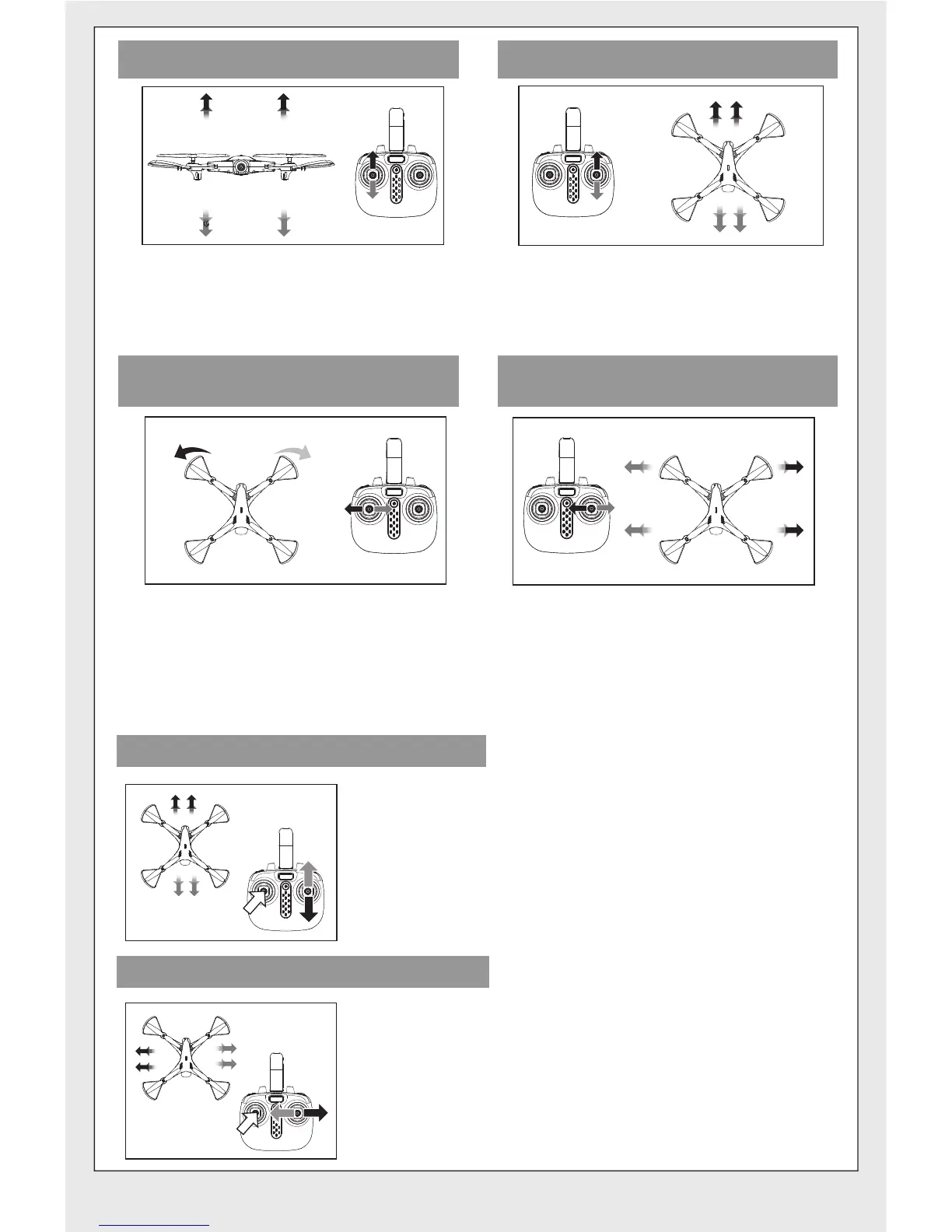
When the left joystick (throttle) is
pushed towards the left or right,
the drone will turn left or right
correspondingly.
When the right joystick (rudder) is
pushed towards the left or right,
the drone will fly sideways on the
left or right correspondingly.
Front
-7-
Ascending and descending control Forward and backward control
When the left joystick (throttle) is
pushed upwards or downwards, the
drone will ascend or descend
correspondingly.
When the right joystick (rudder) is
pushed upwards or downwards, the
drone will fly forward or backward
correspondingly.
Left turning and right turning
control
Left side flying and right side
flying control
-7-
Trimming operation
Forward and backward trim control
If the drone automatically flies forward/backward
while hovering, press in the left joystick and at the
same time push the right joystick
backward/forward slightly to fine tune the
direction. Don’t release the left joystick until the
drone is flying in a stable state.
If the drone automatically flies towards the
left/right side while hovering, press in the left
joystick and at the same time push the right
joystick right/left slightly to fine tune the direction.
Don’t release the left joystick until the drone is
flying in a stable state.
Left/right side flight trim control


 To Next Page