Tap ‘ ’button once more to
enter the ID
(Refer to p7, 7.Create the bell ID)
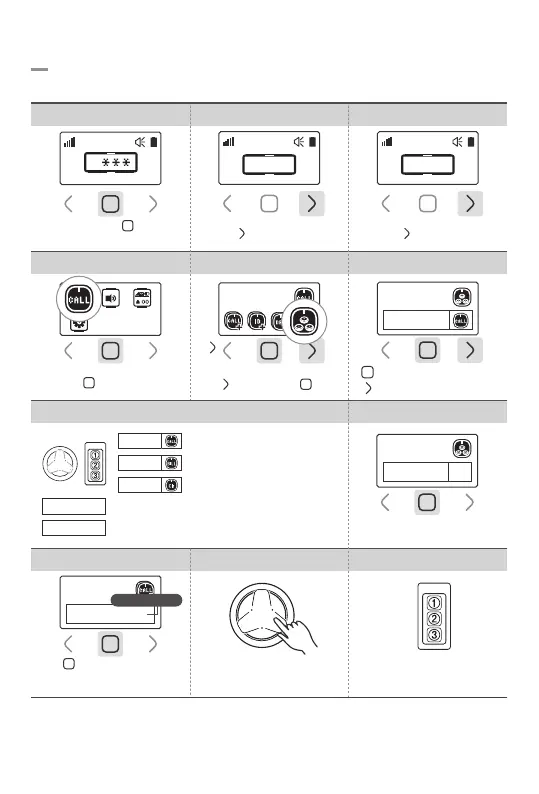
5-5. 3 Button Bell Setting
3 button bell may be used for Call/Bill/Clr/3bell image respectively.
4.Select Bell Setting 5.Select 3Bell Setting
10.Individual Button Registration
9.3 Button Bell Registration
Press the Bell
0
Starts bilnking
8.Bell Registration
7.Individual Button Setting
6.3Button Setting
Press Call or Bill button
to register a 3 button bell
Press each button
to register individually
Each button can be registered
with a different bell ID individually
1-BU SET
1/3BU
3-BU SET
1-BU SET
*Button Function Setting
1/3BU
2/3BU
3/3BU
Choose button icon
Choose button icon
Choose button icon
Use basic functions (Call/Bill/Clr)
Use it as an individual button
* ‘Clear’ button cannot be individually registered under ‘1-BU SET’.
Tap ‘ ’ 3 times then ‘ ’ once
3 Bell Setting
: Set the next button
: Choose icon
3 Button Setting
3 Button Setting
Tap ‘ ’ button once
Touch and hold ‘ ’ button
for 1sec
1. Password Field 2.Enter Password 0000 3.Go to Settings
Tap ‘ ’ button 3 times
0
0 0 0 0
Tap ‘ ’ button once
0 0 0 0
-11-
③
③
②
②
①
①
Call
Clr
Bill



 To Next Page