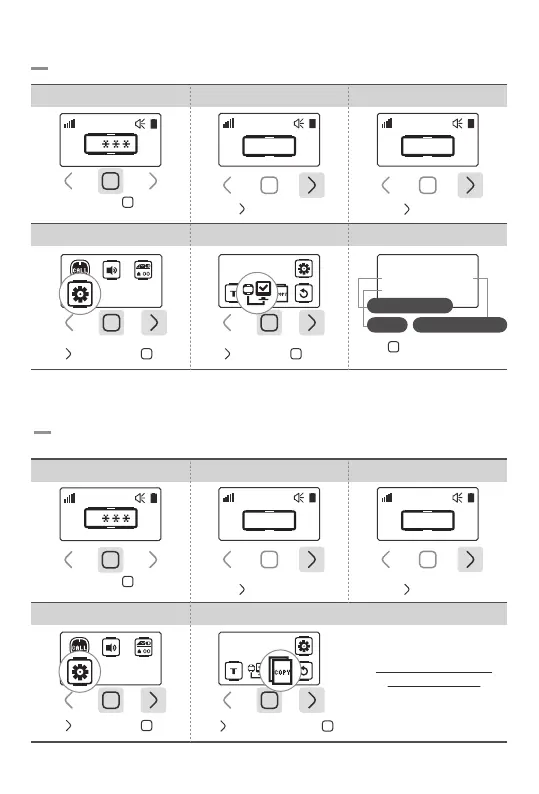
8-2.Device Info & User ID Setting
4. Select Tools 6.Check Device Info
Tap ‘ ’ for User ID setting
*ID must be created with more than one character
5.Select Device Info
Device Info
Device Info
Ver: 0.01e Bell:020
ID: SYSCALL
Firmware Version
User ID No. of registered bell
Tap ‘ ’ 3 times then ‘ ’ once Tap ‘ ’ once then ‘ ’ once
Touch and hold ‘ ’ button
for 1sec
1. Password Field 2.Enter Password 0000 3.Go to Settings
Tap ‘ ’ button 3 times
0
0 0 0 0
Tap ‘ ’ button once
0 0 0 0
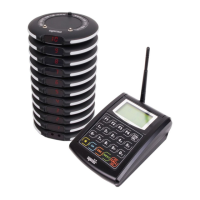
You can copy the registered bell information and the setup data into other pagers wirelessly.
8-3. Wireless Data Copy
4. Select Tools 5.Select Data Copy
Data Copy
‘Receiving Mode’ setting
has to be done first.
Tap ‘ ’ 3 times then ‘ ’ once
Tap ‘ ’ button twice then ‘ ’ once
Touch and hold ‘ ’ button
for 1sec
1. Password Field 2.Enter Password 0000 3.Go to Settings
Tap ‘ ’ button 3 times
0
0 0 0 0
Tap ‘ ’ button once
0 0 0 0
-17-
*Continued in p18.


 To Next Page