Tap ‘ ’ button
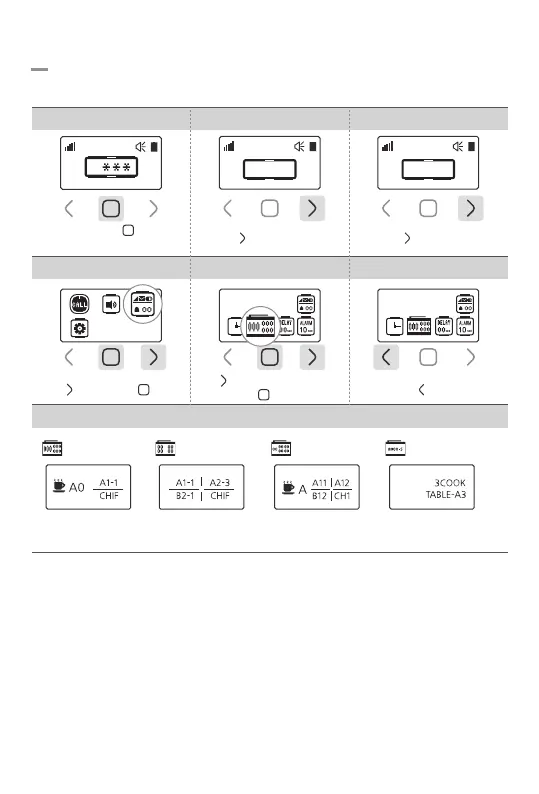
7-2. Display Type Setting
Set the display type (430/440/350/A10).
Tap ‘ ’ once then set the type
with ‘ ’ button
4.Select Display Setting 6.Save & Exit
Tap ‘ ’ twice then ‘ ’ once
5.Set Display Type
*Display Type
440 Display
4 digits 4 display
430 Display
4 digits 3 display
350 Display
3 digits 5 display
A10 Display
10 digits 2 display
*Some alphabets could not be displayed up to 10 digits.
*With icon, it could not be displayed all digits.
*In A10 Display, please choose each message to check full messages.
430 Display430 Display
Touch and hold ‘ ’ button
for 1sec
1. Password Field 2.Enter Password 0000 3.Go to Settings
Tap ‘ ’ button 3 times
0
0 0 0 0
Tap ‘ ’ button once
0 0 0 0
-14-


 To Next Page