FunctionNum
Bell Registration
Pn/Gn Setting
Delete the Bell
3Bell Setting
Sound Setting
Time Setting
Display Type
Delay Time
Alarm Setting
Clr-bell Sound
Test Mode
Device Info
Data Copy
Initialization
-
1/0,0~0
-
Call
Bill
Clear
Vibr
00:00
430
0sec
1sec
on
-
-
-
-
Up to 10 digits
1/0~99
-
Call/etc
Bill/etc
Call/Bill/Clear/etc
Sound/Vibr/Sound+Vibr/Mute
23h 59m 59s
430/440/350/A10
0~60(sec)
0~60(sec)
on/o
-
-
-
-
New bell registration and re-registration
Set Pn/Gn when it works with a multi-transmitter
Delete the registered bell
Set ① button icon
Set ② button icon
Set ③ button icon
Choose the type of alarm
24h digital watch
4 type of display mode
To prevent alarm duplicated
Set the alarm time
Clear bell alarm ON/OFF
Self-test of button keys, sound, RF and screen
Version, user ID, number of registered bell
Wireless data copy
Initializing all data
Scope Description
Default
4. About SB-700
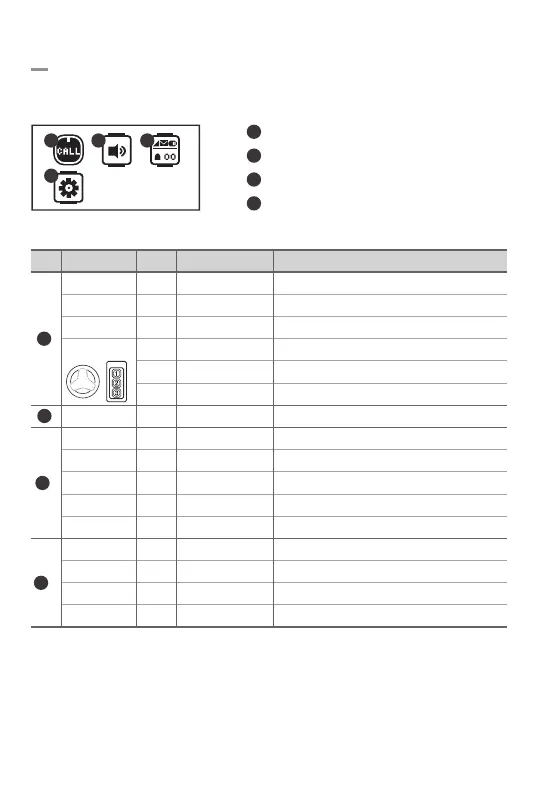
There are four setup menus in SB-700, and each setup menu contains sub-setup menus as below.
Bell Setting
Sound Setting
Display Setting
Tools
1
1
1
2
2
3
3
4
4
4
2 3
-6-
③
②①


 To Next Page