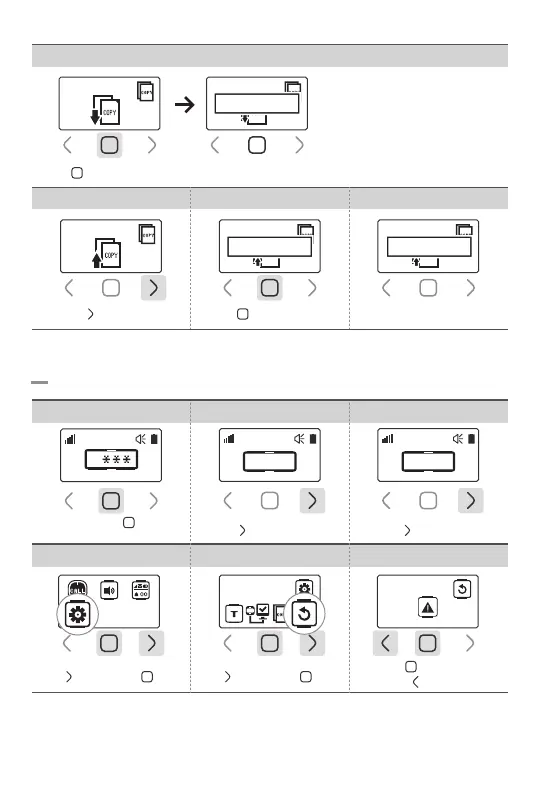
8-4.Initialization
Tap ‘ ’ 3 times then ‘ ’ once Tap ‘ ’ 3 times then ‘ ’ once
Tap ‘ ’ button once
The pager which is ‘Receiving Mode’
has to be set first.
*Multiple pagers can receive copy
data
Receiving Mode
6.Receiving Mode Setting
Tap ‘ ’ button then data copy is ready
Receiving Mode
Precessing…
7.Sending Mode Setting 8.Start Data Copy
Sending Mode
9.Data Copy Completed
Tap ‘ ’ button to start
Sending Mode
Precessing…
Sending Mode
Completed
4. Select Tools 6.Initialization5.Select Initialization
Initialization
Remove All Data?
Tap ‘ ’ to initialize
Tap ‘ ’ to cancel
Touch and hold ‘ ’ button
for 1sec
1. Password Field 2.Enter Password 0000 3.Go to Settings
Tap ‘ ’ button 3 times
0
0 0 0 0
Tap ‘ ’ button once
0 0 0 0
-18-


 To Next Page