MACHINE CONFIGURATION
TRAVEL SYSTEM
III-13 TB53FR
3
4
G4C307
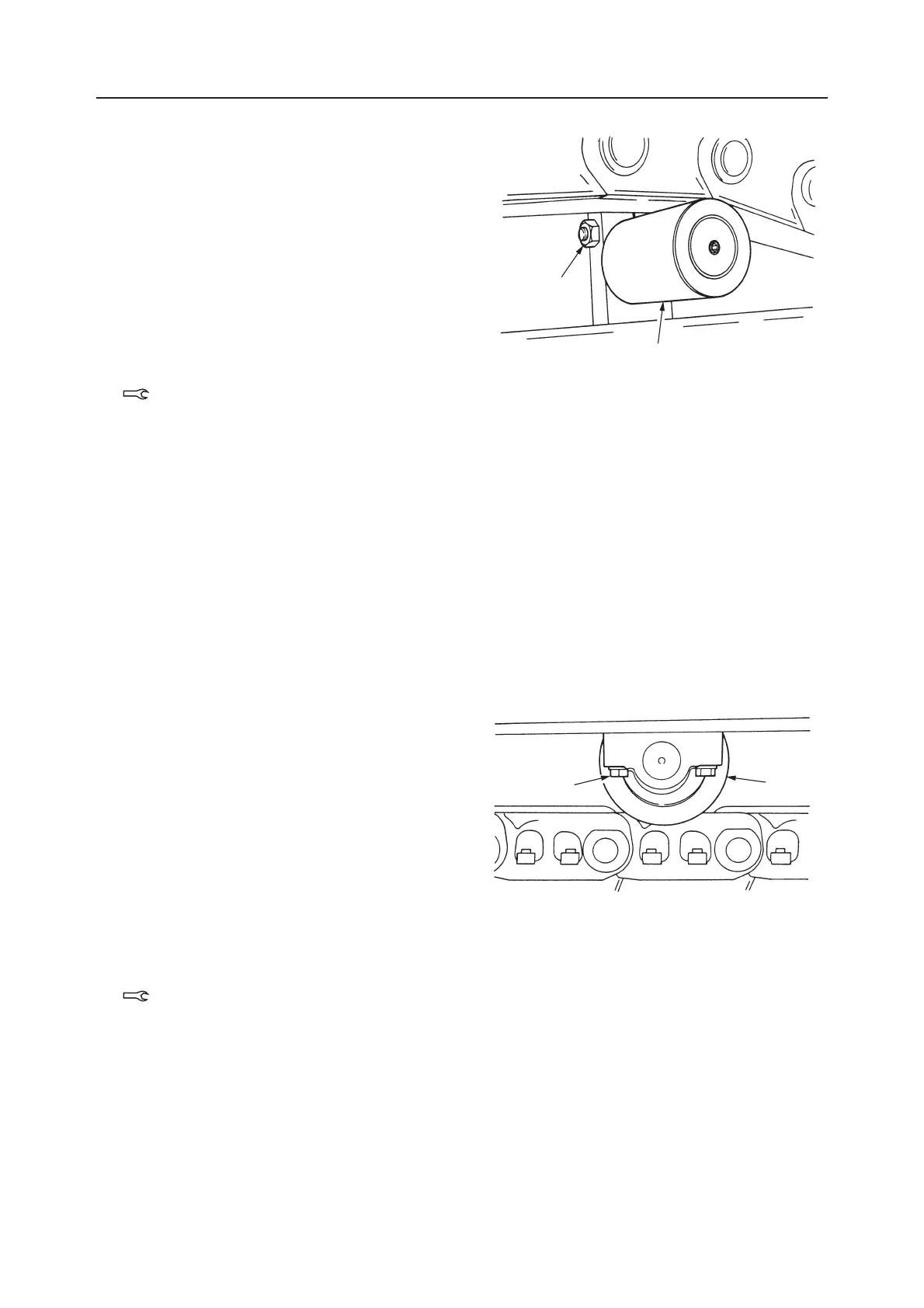
Removing the Carrier Roller
1. Loosen the tension in the crawler belt.
2. Using a hydraulic jack, push up the crawler belt.
3. Loosen the installation nut (3) and remove the
bolt, then remove the upper roller (4).
Installing the Carrier Roller
Follow the procedure used to remove the upper roller
in reverse order.
• When tightening the installation nut, apply
thread lock to the threads.
Installation nut: 256 ±12.7 N·m
Removing the Track Roller
1. Loosen the crawler tension.
2. Loosen the roller installation bolt (1) slightly
(approximately 1 turn).
3. Raise the machine body, take out the installation
bolt (1) and remove the roller (2).
Installing the Track Roller
1. Tighten the roller (2) installation bolt (1) tempo-
rarily.
2. Bring the machine body in full contact with the
ground, then tighten the bolt.
Bolt: 102 ±5.1 N·m
• Apply thread lock to the threads of the bolt.
3. Raise the machine body, then adjust the tension of
the crawler.
Raise the machine body, then adjust the tension of
the crawler.
J1C309
2
1



 To Next Page