Rugged Mini E1 | User’s Manual
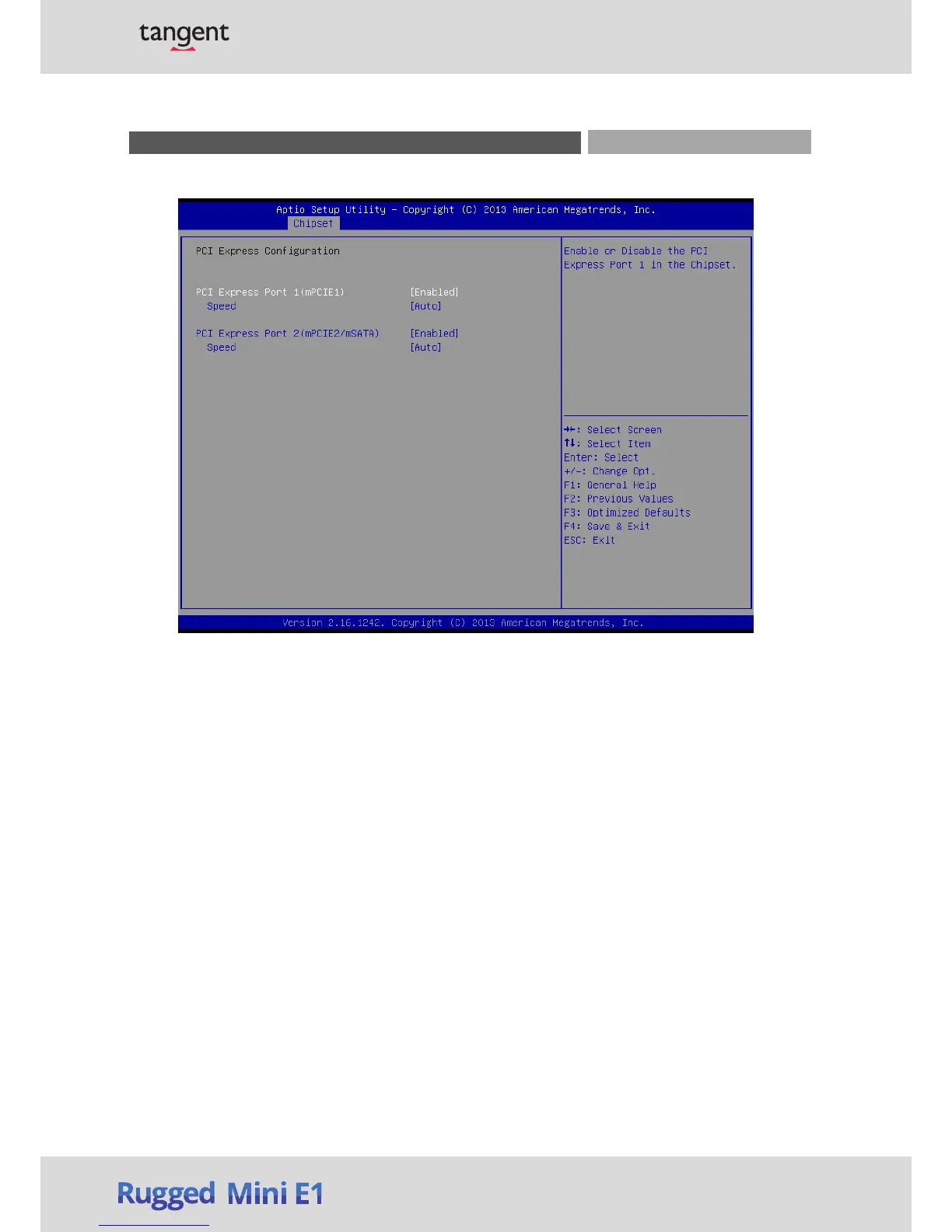
PCI Express Port 1 (mPCIE1)
This item allows you to enable or disable PCI Express Port 1 (mPCIE1) in the Chipset.
Speed
Change the PCIe Port Speed. Select <AUTO> ,<Gen 2> or <Gen 1>
PCI Express Port 2 (mPCIE2/mSATA)
This item allows you to enable or disable PCI Express Port 2 (mPCIE2/mSATA) in the Chipset.
Speed
Change the PCIe Port Speed. Select <AUTO> ,<Gen 2> or <Gen 1>
■ High Precision Timer
Enable or disable High Precision Event Timer (HPET) in the operating system.
■ Restore AC Power Loss
This item specifies whether your system will reboot after a power failure or interrupt occurs. Available
settings are:
Power Off: Leave the computer in the power off state.
Power On: Leave the computer in the power on state.
Last State: Restore the system to the previous status before power failure or interrupt occurred.
Chapter 3: BIOS Setup
■ PCI Express Configura
tion


 To Next Page