40
Table 4.3 Zero, calibration, bump test, response and recovery time testing
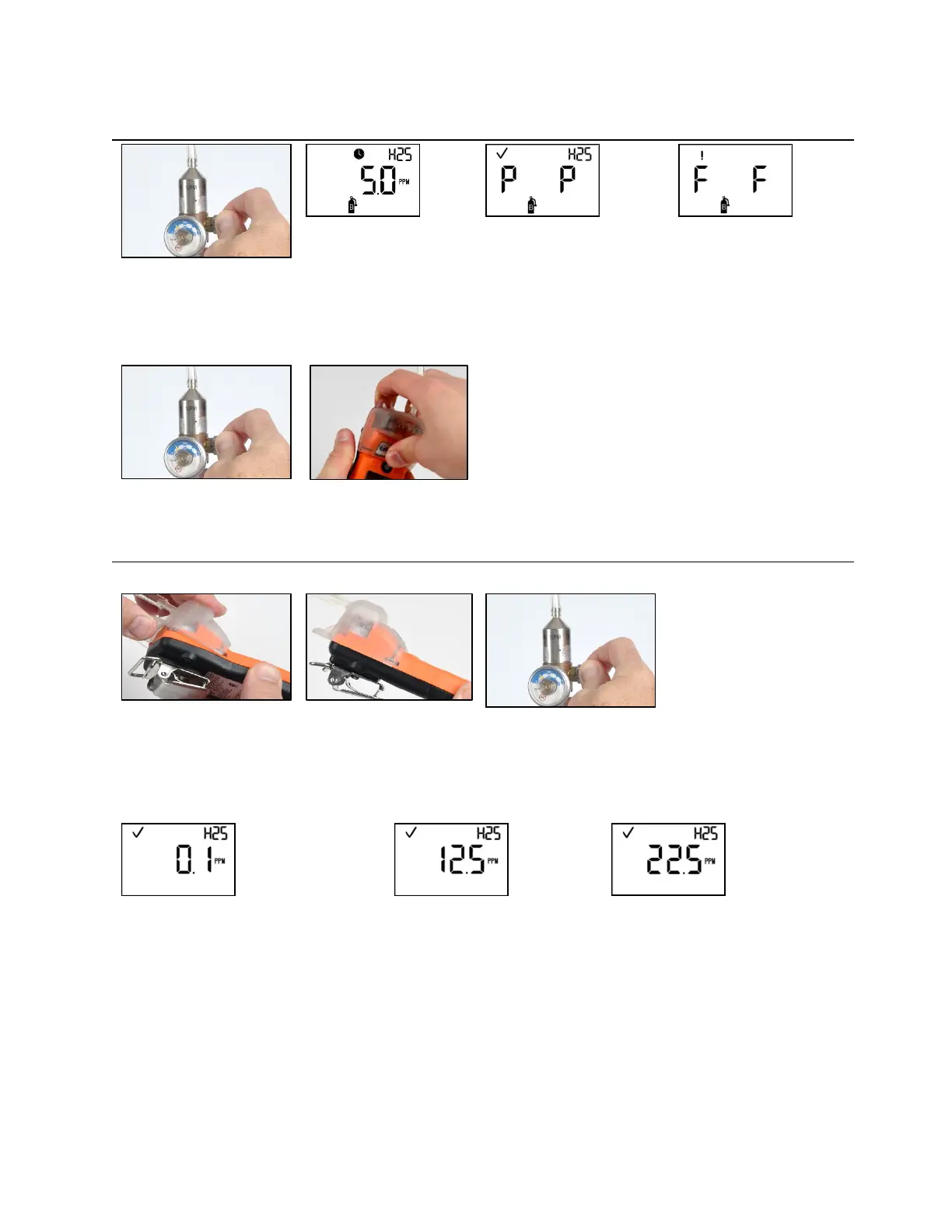
Bump test in progress
Bump test results (pass)
Bump test results (fail)
To start the flow of gas, turn the regulator knob in a
counterclockwise direction.
If either or both sensors fail the bump test, the calibration due
warning screen will be automatically activated. Calibrate the
instrument.
If both sensors pass the bump test, the home screen will be
automatically activated.
—
—
To stop the flow of gas, turn
the regulator knob in a
clockwise direction and
tighten.
To remove the calibration
cup, lift up from the cup's
tabs. Set aside or store for
future use.
Response time testing
Place the calibration cup over the case top; align its top
groove with the small ridge at the top of the instrument.
Press down to secure the cup in place; a click will sound.
Visually inspect the calibration cup to ensure its edges along
the top and sides align with the case top edges.
To start the flow of gas, turn the regulator knob in a
counterclockwise direction.
Gas response on the normal reading screen
Reading at 50% of calibration gas
Reading at 90% of calibration gas
Start a timer when the display shows a
response to the calibration gas.
Note: Response time is to be tested at the normal
reading screen.
Stop the timer when the displayed reading reaches 50% or 90% of the
calibration gas concentration. If the time to reach the 50% or 90% times
specified in the sensor specifications is greater than 30%, the sensor should be
replaced.



 To Next Page