Selecting the input source
This unit has two inputs (INPUT A and INPUT
B) that can be selected separately as input
sources.
The built-in mics (front panel MIC A and MIC
B) or external input signals (inputs through the
INPUT A and INPUT B jacks on the rear panel)
can be selected as input sources. In addition to
mic and line signals, the INPUT A 1/4” phone
jack input can accept guitar input. Set the
MIC/LINE–GUITAR switch on the rear panel
according to the type of input.
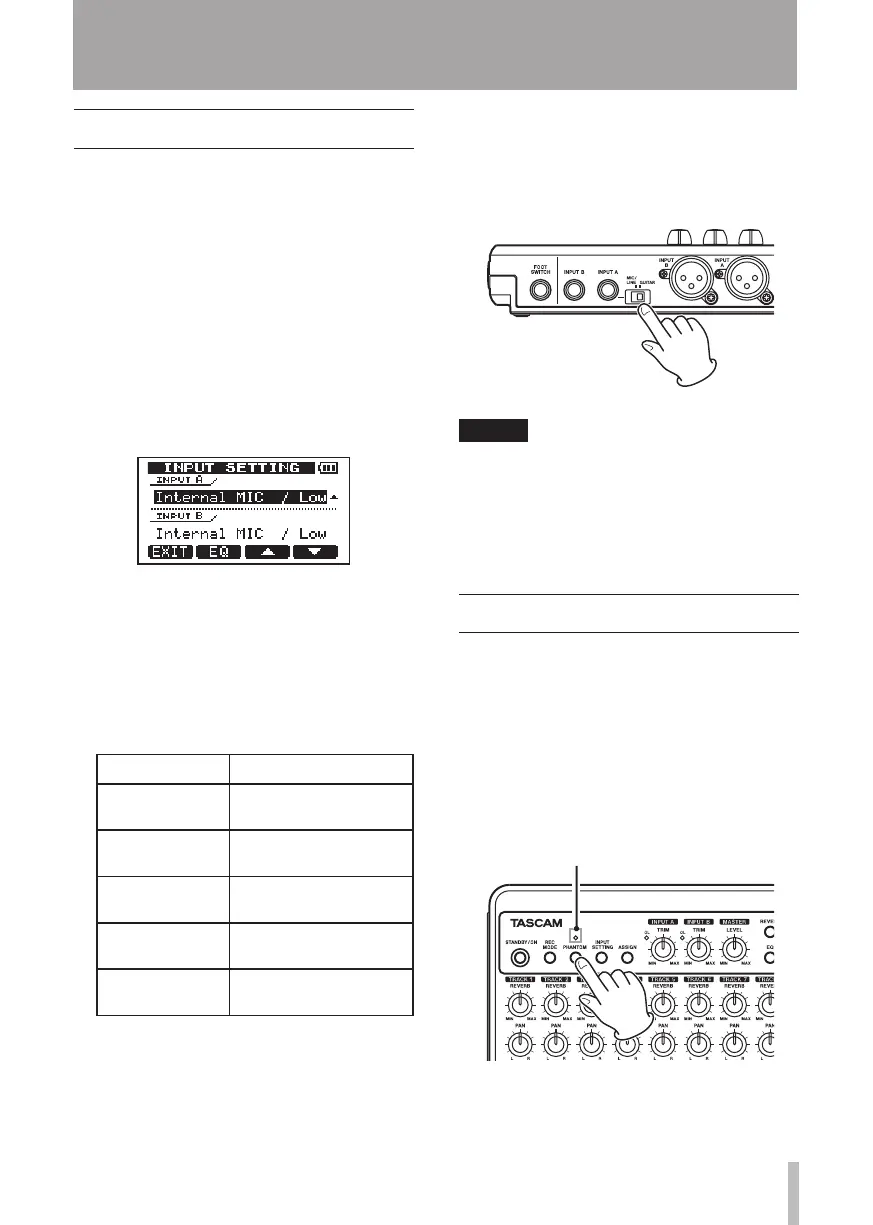
1 Press the INPUT SETTING key to open the
INPUT SETTING
screen.
Use the
INPUT A
and
INPUT B
items to
set the input sources for the INPUT A and
INPUT B.
2 Use the F3 (§) and F4 (¶) keys to select
the
INPUT A
or
INPUT B
setting, and turn
the DATA wheel to select the input source.
INPUT A/B
selection choices
Choices Descriptoin
Internal MIC
/ Low
(default)
Built-in MIC A/B (low
sensitivity)
Internal MIC
/ High
Built-in MIC A/B (high
sensitivity)
Ext. Input,
LINE / Low
External input A/B
(low sensitivity)
Ext. Input /
Mid
External input A/B
(middle sensitivity)
Ext. Input /
Hig h
External input A/B
(high sensitivity)
3 After changing the setting, press the
HOME key to return to the Home Screen.
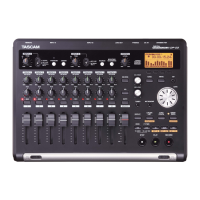
4 If a source that uses the INPUT A
connector is selected as the
INPUT A
input source in step 2 above, set the MIC/
LINE–GUITAR switch on the rear side
panel appropriately. Set it to GUITAR
when connecting an electric guitar or
electric bass directly. Set it to MIC/LINE
when inputting a mic or line signal.
TIP
When connecting an electric-acoustic guitar
with a built-in preamp or an active electric
guitar, as well as when connecting an
electric guitar with effect boxes between
it and this unit, set the MIC/LINE–GUITAR
switch to MIC/LINE.
Phantom power
When connecting a condenser microphone that
requires phantom power, follow the procedures
below to turn phantom power ON. When
phantom power is ON, phantom power is
provided to both INPUT A and INPUT B XLR
jacks.
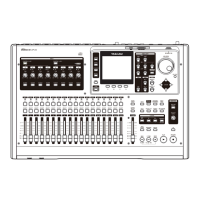
1 When the recorder is stopped, press
the PHANTOM key to open the
PHANTOM
screen.
6 – Basic Recording










 To Next Page