15 – Commonly-used Functions
This section is a brief guide to some operations
on the DP-008 which may not be immediately
obvious from looking at the panel controls.
Key sequences are written like this:
•
STOP
+ Ô means “press and hold the STOP
key and press Ô.”
Menu items are written like this:
•
MENU ®
CARD
®
FORMAT
, meaning “press the MENU
key, select the
CARD
menu, and then the
FORMAT
action.
The list of popup messages and their mean-
•
ing (“Messages” on page 79) may also be
useful to you.
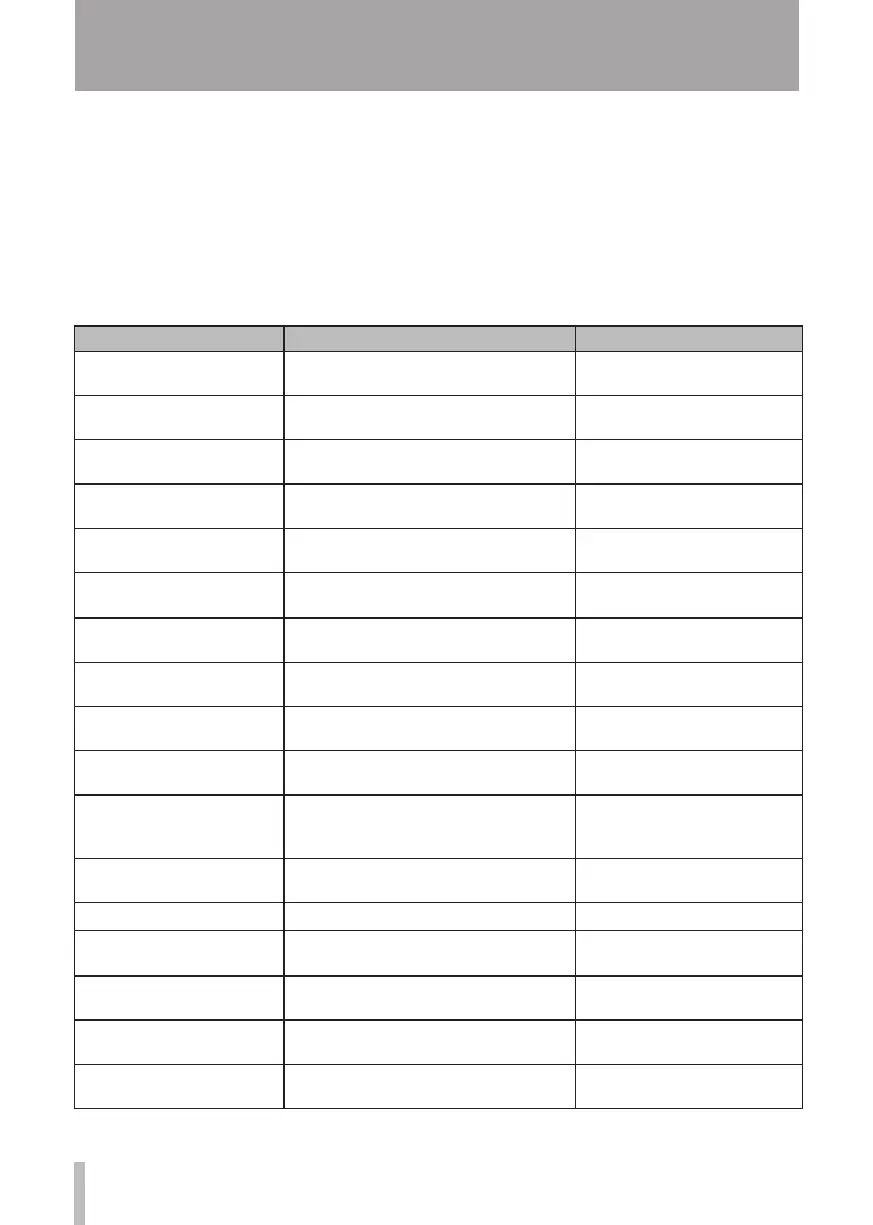
How to Keys, etc. TO press Description
Format the FAT partition
MENU ®
CARD
®
FAT REFORMAT
See "Reformatting the FAT
partition" on page 70.
Set the IN and OUT points "IN/OUT, F3, F4" See "Setting IN and OUT points"
on page 55.
Edit the IN and OUT points "IN/OUT, F2" See "Setting IN and OUT points"
on page 55.
Use the USB connection Connect the unit and a PC with the USB
cable.
See "Connecting with a
computer" on page 71.
Remove the USB connection Disconnect the unit from a PC See "Disconnecting" on page
72.
Import a WAV file to a track
MENU ®
IMPORT/EXPORT
®
IMPORT TRACK
See "Importing tracks" on page
75.
Choose another partition as
the active partition
MENU ®
CARD
® PARTITION
See "Selecting the active
partition" on page 36.
Tune a guitar or wind
instrument
TUNER
See "Tuner" on page 64.
Find out the current partition
MENU ®
INFORMATION
See "Viewing information" on
page 66.
Make all of an SD card
usable by a PC
MENU ®
CARD
®
SD INITIALIZE
See "Initializing SD cards" on
page 70.
Format an SD card
MENU ®
CARD
®
FORMAT
See "Formatting cards and
setting partition sizes" on page
68.
Create a new song
MENU ®
SONG
®
CREATE
See "Creating a new song" on
page 13.
Create a stereo master track
REC MODE ®
MASTER REC
See "Mastering" on page 48.
Export a stereo master track
to a PC
MENU ®
IMPORT/EXPORT
®
EXPORT MASTER
See "Exporting a stereo master
track" on page 77.
Redo one operation UNDO/REDO See "Undoing operations" on
page 49.
Undo one operation UNDO/REDO See "Undoing operations" on
page 49.
Name a song
MENU ®
SONG
®
NAME EDIT
See "Editing names" on page
37.










 To Next Page