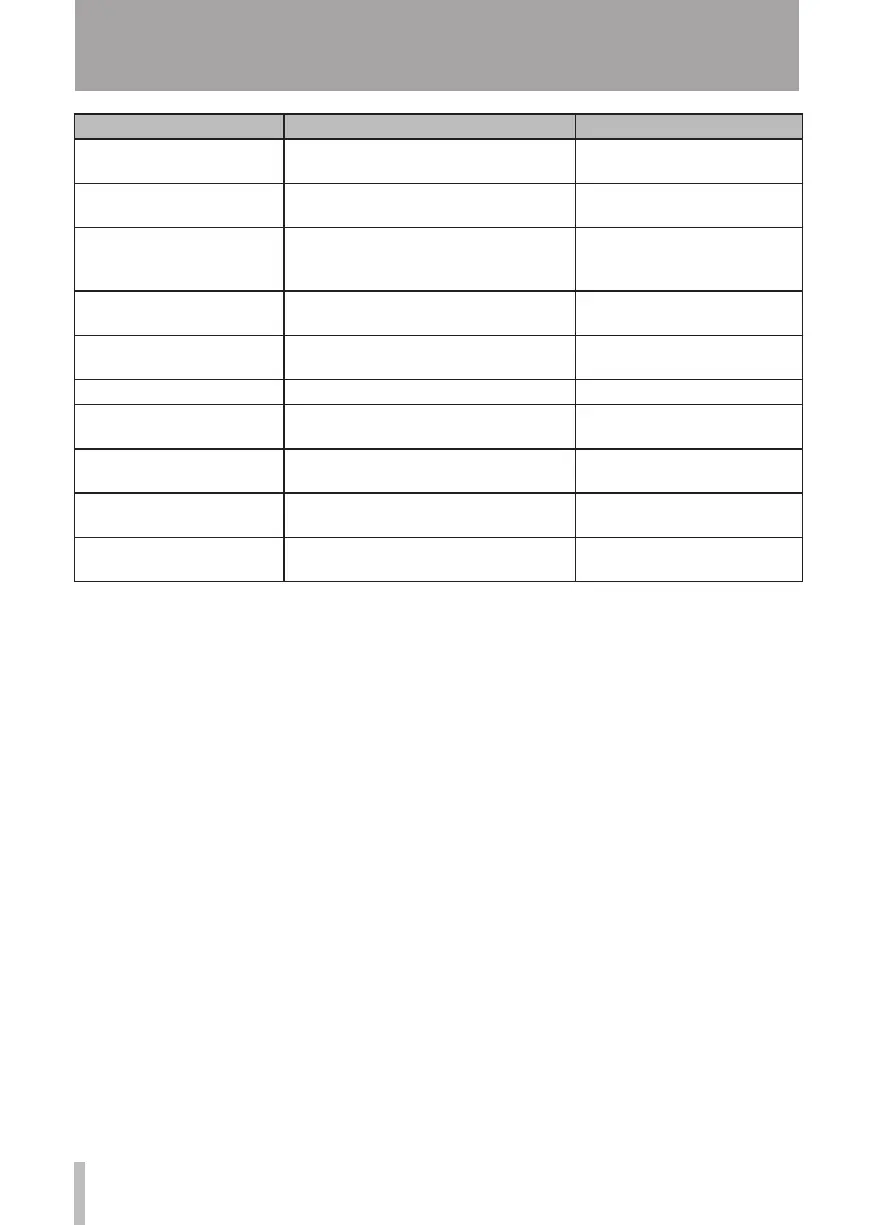
How to Keys, etc. TO press Description
Record a guitar INPUT SETTING See "Selecting the input source"
on page 41.
Change the track to which
INPUT A/B is assigned
ASSIGN See "Assigning inputs" on page
43.
Change the interval time
during repeat
MENU ®
PREFERENCE
See "Setting the interval
between repetitions" on page
56.
Use the auto off function
MENU ®
PREFERENCE
See "Turning the power off
automatically" on page 66.
Change the screen contrast
MENU ®
PREFERENCE
See "Adjusting the contrast" on
page 34.
Add reverb REVERB See "Reverb" on page 46.
Use EQ on an input signal
INPUT SETTING
®
F2
See "Using input EQ" on page
43.
Use EQ on a track EQ See "Track EQ (equolizer)" on
page 45.
Use phantom power PHANTOM See "Phantom power" on page
41.
Mute the playback sound of
the track
REVERB
+
EQ See "Muting tracks" on page
47.
15 – Commonly-used Functions










 To Next Page