In order to recharge an iOS device, you must connect the
device to the dock connector cable before connecting the
USB cable.
r DIGITAL OUT (coaxial) jack
This RCA pin jack is a coaxial digital output compliant with
IEC60958-3 (S/PDIF) standards.
t LINE OUT L/R unbalanced jacks
These RCA pin jacks are analog line outputs (L/R).
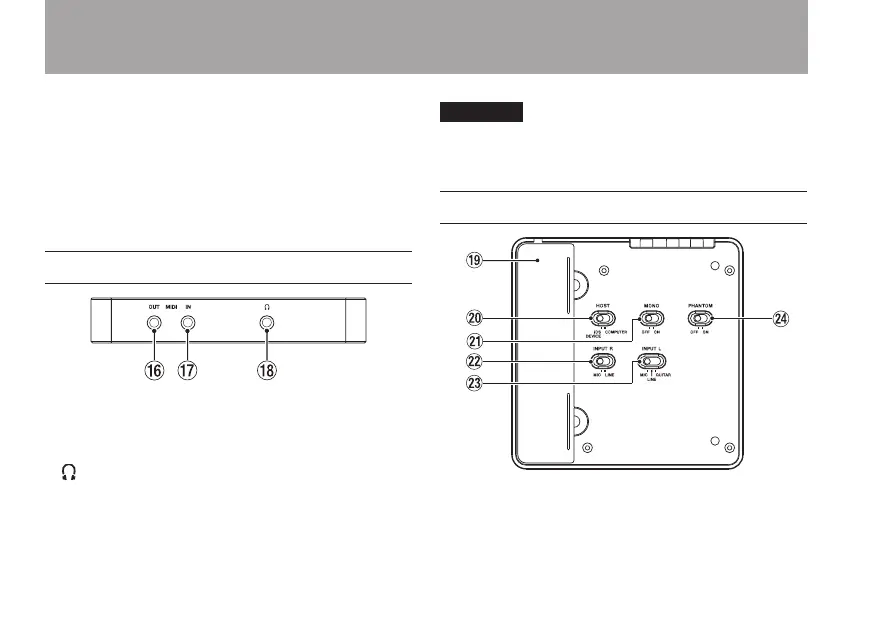
Left side panel
y MIDI OUT jack
This sends MIDI output.
u MIDI IN jack
This receives MIDI input.
i (3.5mm stereo headphones) jack
Use this jack to connect stereo headphones. Use an adapter
to connect headphones with a standard (1/4”) jack.
CAUTION
Before connecting headphones, minimize the volume with the
PHONES knob. Failure to do so could result in sudden loud
noises that might damage your hearing or cause other harm.
Bottom panel
o Dock connector cable storage
This holds the dock connector cable used to connect iOS
devices.
2 – Names and Functions of Parts


 To Next Page