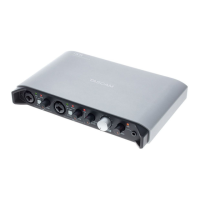
Thank you very much for purchasing the TASCAM iU2 Audio/
MIDI Interface for iPhone/iPad/iPod touch.
Please read this manual thoroughly before using the unit so
that you understand correct operating procedures and can use
its functions fully. We hope that you enjoy using this unit for
many years.
Please keep this manual so that you can read it at any time. A
digital copy of this manual can also be downloaded from our
website (http://tascam.com/)
Overview
In addition to being able to use this unit as a USB audio/MIDI
interface with a computer, you can also connect it to an iOS
device and easily set up a compact digital recording system.
(The iPhone 4S, iPhone 4, iPad 2, iPad and iPod touch (4th
generation) are currently supported.)
Moreover, you can use the iU2 to record music cassette tapes
and other analog audio sources to a computer for transfer to
audio CDs or to an iOS device directly where they can be saved
as audio les.
Features
USB audio interface with 2 inputs and 4 outputs•
Supports 44.1/48 kHz, 16-bit recording•
High-quality sound transfer using the dock connector for •
digital connection
Balanced mic/line input jacks (standard TRS) support •
phantom power
Phantom power supplied by USB bus power •
High-quality mic preamps •
Guitar input (standard TS jack)•
Headphones output (standard TRS jack) •
Headphones and line outputs are independent and have •
separate volume controls
Direct monitoring function can be used for input •
monitoring without latency
S/PDIF digital output jack•
MIDI input and output can be used with a connected iOS •
device or computer
Power can be supplied from a computer or from an iOS •
device using the dock connector
Works with the standard audio driver for iPhone 4/iPad 2/•
iPad/iPod touch (4th generation) on Windows XP, Windows
Vista, Windows 7 and Mac OS X
Connects using WDM on Windows and Core Audio/Core •
MIDI on Macintosh
Records on iOS devices using an iOS application from •
TASCAM or another existing iOS application
Firmware updates possible using iOS•
iOS device can be recharged via the Mini USB port•
1 – Introduction


 To Next Page