55
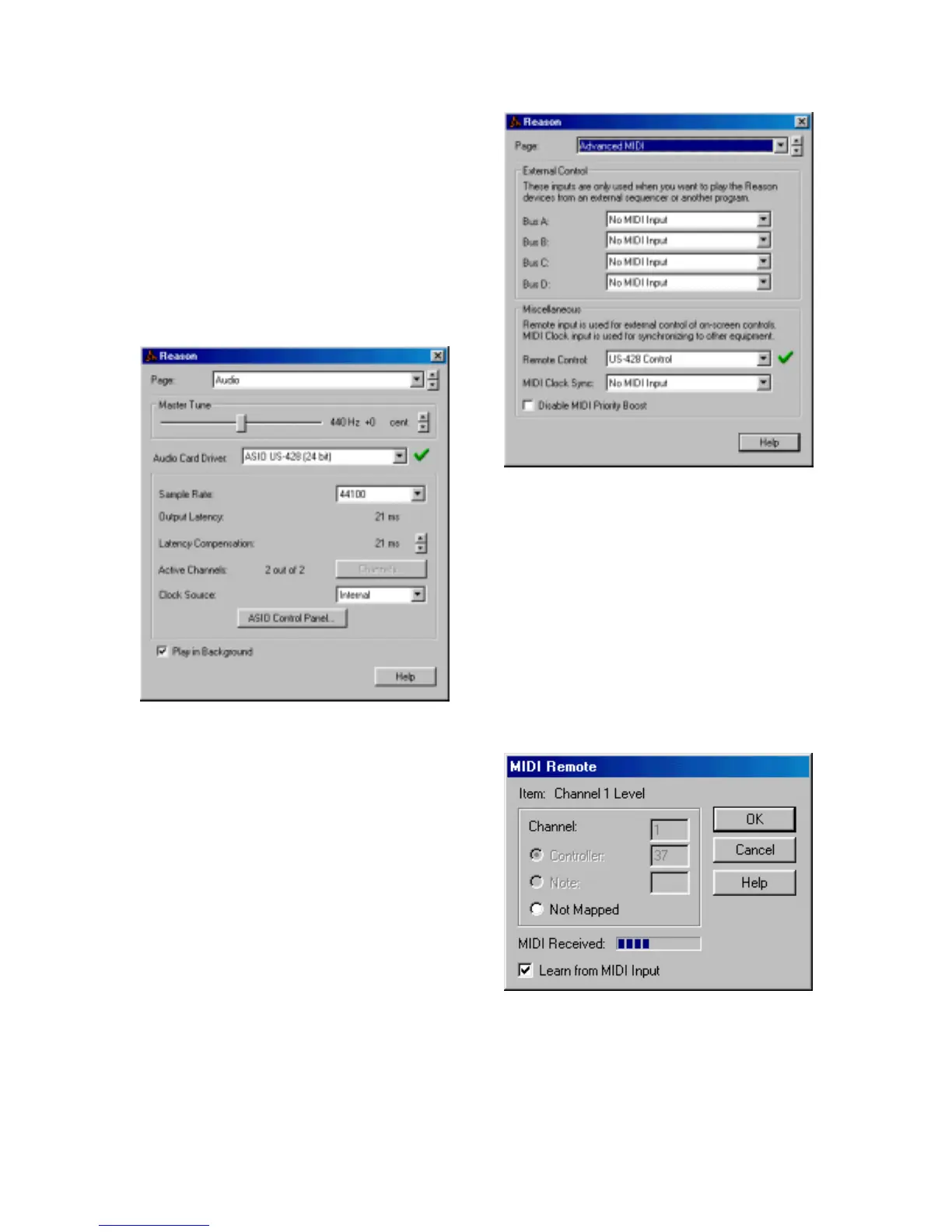
Driver” select “ASIO US-428 ASIO
Driver…” either the 24-bit or 16-bit
version. Also set your sample rate.
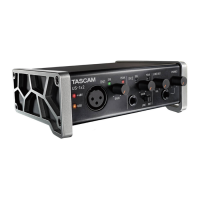
Now go to the “Advanced MIDI” page of
the Preferences, and select “US-428
Control Port” under “Remote Control.”
This tells Reason to receive US-428
control surface input to control Reason
knobs, faders, and buttons. You can
now close the Preferences window.
Under the Options menu, make sure
that “Enable MIDI Remote Mapping” is
checked, or select it once if it isn’t. This
lets control surface input affect the
Reason controls. To set-up the mapping
between US-428 buttons, faders, and
knobs, and the virtual Reason controls,
make sure that “Edit MIDI Remote
Mapping” under the Options menu is
also checked.
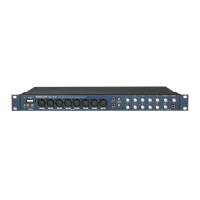
To map a US-428 control to a particular
Reason control, first use your mouse to
click on the control. The “MIDI Remote”
Illustration 8.05 – Reason (Audio Page)
Illustration 8.06 – Reason (Advanced MIDI Page)
Illustration 8.07 – Reason (MIDI Remote Page)



 To Next Page