9-46
User Authentication and Accounting (User Login, Job Accounting) > Configuring Job Accounting
Counting the Number of Pages Printed
This counts the number of pages printed. Counts are classified into Total Job Accounting and Each Job Accounting. A
new count can also be started after resetting the count data which was stored for a certain period of time.
1
Display the screen.
1 [System Menu/Counter] key > [User Login/Job Accounting] > "Job Accounting
Settings" [Next]
2 "Job Accounting (Local)" [Next] > "Total Job Accounting" [Next] or "Each Job Accounting"
[Check]
2
Configure the settings.
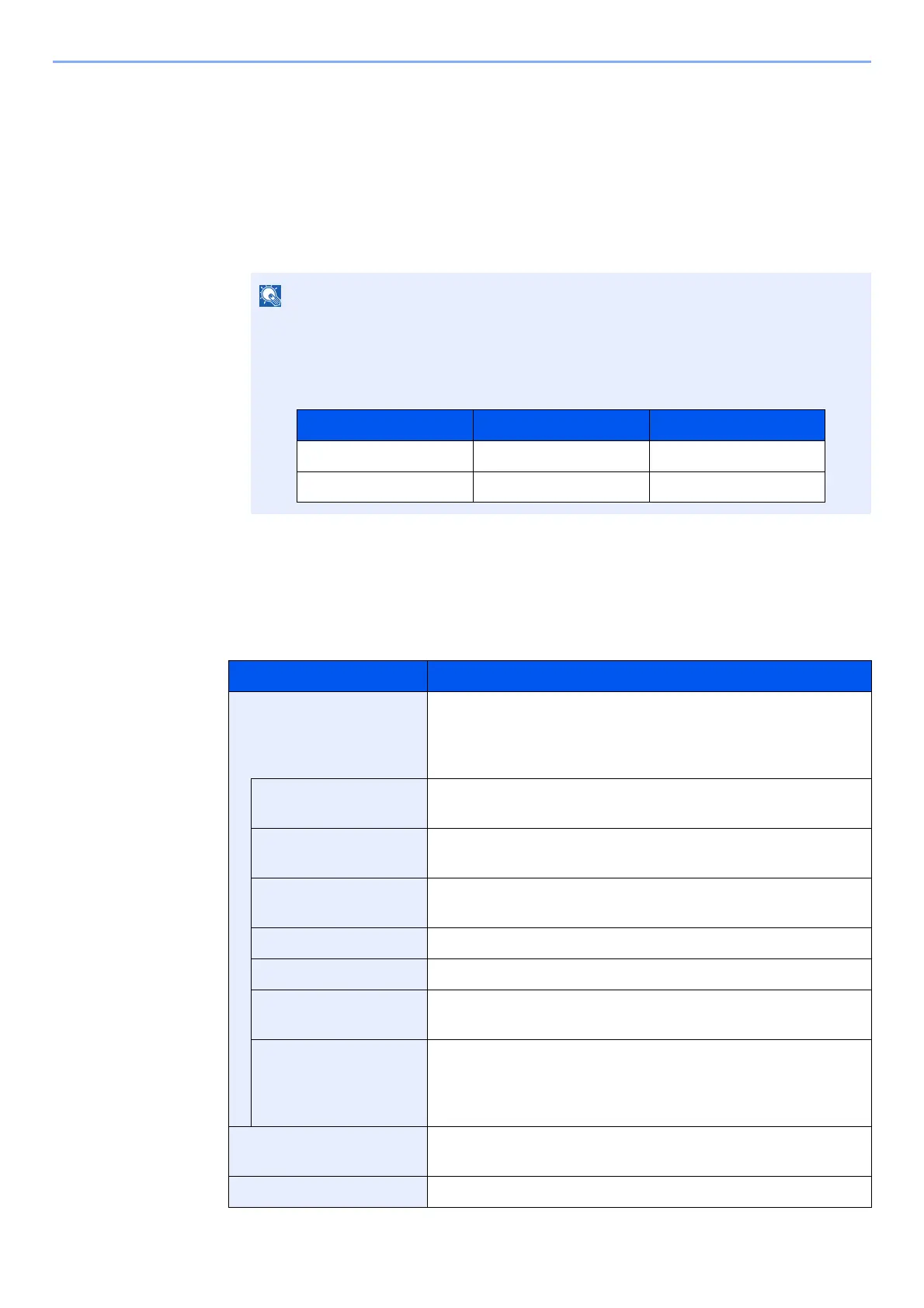
The table below lists the item you can view.
If the login user name entry screen appears during operations, enter a login user name
and password, and select [Login]. For this, you need to login with administrator
privileges.
The factory default login user name and login password are set as shown below.
Item Descriptions
Printed Pages Displays the number of pages copied and printed, and the total
number of pages used. You can also use [FAX]
*1
, [Count by
Paper Size], [by Duplex] and [by Combine] to check the
number of pages used.
Copy (B & W) Displays the number of pages used for black and white
copying.
Printer (B & W) Displays the number of pages used for black and white
printing.
Copy/Printer (B/W) Displays the total number of pages used for black-and-white
copying and printing.
FAX
*1
Displays the number of pages received.
Total Displays the total number of pages used.
Count by Paper Size Displays the number of pages used in the selected paper size
as well as the number of pages used in other paper sizes.
Count by Duplex/
Combine
Displays the number of pages used in Duplex (1-sided) mode,
Duplex (2-sided) mode and the total for both, as well as the
pages used in Combine (None) mode, Combine (2in1) mode,
Combine (4in1) mode and the total for all three.
Scanned Pages Displays the number of pages scanned for copying, faxing and
other functions, as well as the total number of pages scanned.
FAX TX Pages
*1
Displays the number of pages faxed.
Model Name Login User Name Login Password
TASKalfa 3011i 3000 3000
TASKalfa 3511i 3500 3500



 To Next Page